Vue使用讯飞实时语音识别
进入讯飞官方文档实时语音识别通过下载示例demo,这里选择的是demo js.创建项目并引入js文件这里使用的是vue项目,便在public下的index.html直接引入了<script src="./js/hmac-sha256.js"></script><script src="./js/HmacSHA1.js"></script><s
·
进入讯飞官方文档实时语音识别通过下载示例demo,这里选择的是demo js.
创建项目并引入js文件
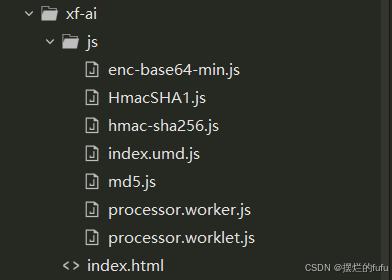
这里使用的是vue项目,便在public下的index.html直接引入了
<script src="./js/hmac-sha256.js"></script>
<script src="./js/HmacSHA1.js"></script>
<script src="./js/md5.js"></script>
<script src="./js/enc-base64-min.js"></script>
<script src="./js/index.umd.js"></script>
创建vue页面
其中的appId和secretKey需要在讯飞工作台中找到自己申请的进行替换。
其中mounted中所引用的js代表processor.worker.js所在文件地址。
this.recorder = new RecorderManager("../js");
<template>
	<div>
		{{message}}
		<div>浏览器录音听写:<button @click.stop="startLuyin">{{btnTxt}}</button></div>
		<div>输出结果:{{resultText}}</div>
	</div>
</template>

<script>
	export default {
		name: 'App',
		data() {
			return {
				message: 'Hello Vue!',
				btnStatus:"UNDEFINED", // "UNDEFINED" "CONNECTING" "OPEN" "CLOSING" "CLOSED"
				recorder:null,
				resultText:'',
				resultTextTemp:'',
				countdownInterval:null,
				iatWS:null,
				btnTxt:'开始录音',
			};
		},
		created() {
		},
		mounted(){
		  this.recorder = new RecorderManager("../js");
		  this.recorder.onStart = () => {
		      this.changeBtnStatus("OPEN");
		  }
		  this.recorder.onFrameRecorded = ({ isLastFrame, frameBuffer }) => {
		      if (this.iatWS.readyState === this.iatWS.OPEN) {
		          this.iatWS.send(new Int8Array(frameBuffer));
		          if (isLastFrame) {
		              this.iatWS.send('{"end": true}');
		              this.changeBtnStatus("CLOSING");
		          }
		      }
		  }
		  this.recorder.onStop = () => {
		      clearInterval(this.countdownInterval);
		  };
		  console.log("this.re",this.recorder);
		},
		methods:{
		  startLuyin(){
		      if (this.btnStatus === "UNDEFINED" || this.btnStatus === "CLOSED") {
		          this.connectWebSocket();
		      } else if (this.btnStatus === "CONNECTING" || this.btnStatus === "OPEN") {
		          // 结束录音
		          this.recorder.stop();
		      }
		  },
		  changeBtnStatus(status) { //改变状态
		      this.btnStatus = status;
		      if (status === "CONNECTING") {
		      this.btnTxt = "建立连接中";
		      this.resultText = "";
		      this.resultTextTemp = "";
		      } else if (status === "OPEN") {
		          this.btnTxt = "录音中";
		      } else if (status === "CLOSING") {
		          this.btnTxt = "关闭连接中";
		      } else if (status === "CLOSED") {
		          this.btnTxt = "开始录音";
		      }
		  },
		  getWebSocketUrl(){
		      var url = "wss://rtasr.xfyun.cn/v1/ws";
		      var appId = "xxxxxxxx";//替换成自己的appid和key值
		      var secretKey = "xxxxxxxxxxxxxx";
		      var ts = Math.floor(new Date().getTime() / 1000);
		      var signa = hex_md5(appId + ts);
		      var signatureSha = CryptoJSNew.HmacSHA1(signa, secretKey);
		      var signature = CryptoJS.enc.Base64.stringify(signatureSha);
		      signature = encodeURIComponent(signature);
		      return `${url}?appid=${appId}&ts=${ts}&signa=${signature}`;
		  },
		  renderResult(resultData){
		      let jsonData = JSON.parse(resultData);
		      if (jsonData.action == "started") {
		          console.log("握手成功");
		      } else if (jsonData.action == "result") {
		          const data = JSON.parse(jsonData.data)
		          // 转写结果
		          let resultTextTemp = ""
		          data.cn.st.rt.forEach((j) => {
		              j.ws.forEach((k) => {
		              k.cw.forEach((l) => {
		                  resultTextTemp += l.w;
		              });
		              });
		          });
		          if (data.cn.st.type == 0) {
		              // 【最终】识别结果:
		              this.resultText += resultTextTemp;
		              resultTextTemp = ""
		          }
		          this.resultText = resultText + resultTextTemp
		      } else if (jsonData.action == "error") {
		          // 连接发生错误
		          console.log("出错了:", jsonData);
		      }
		  },
		  connectWebSocket(){
		      const websocketUrl = this.getWebSocketUrl();
			  console.log("web",websocketUrl);
		      if ("WebSocket" in window) {
				  console.log("WebSocket");
		          this.iatWS = new WebSocket(websocketUrl);
				  console.log("iatWS",this.iatWS);
		      } else if ("MozWebSocket" in window) {
				  console.log("MozWebSocket");
		          this.iatWS = new MozWebSocket(websocketUrl);
		      } else {
		          alert("浏览器不支持WebSocket");
		          return;
		      }
		      this.changeBtnStatus("CONNECTING");
		      this.iatWS.onopen = (e) => {
		          // 开始录音
		          this.recorder.start({
		              sampleRate: 16000,
		              frameSize: 1280,
		          });
		      };
		      this.iatWS.onmessage = (e) => {
		          this.renderResult(e.data);
		      };
		      this.iatWS.onerror = (e) => {
		          console.error(e);
		          this.recorder.stop();
		          this.changeBtnStatus("CLOSED");
		      };
		      this.iatWS.onclose = (e) => {
		          this.recorder.stop();
		          this.changeBtnStatus("CLOSED");
		      };
		  },
		  }
	};
</script>
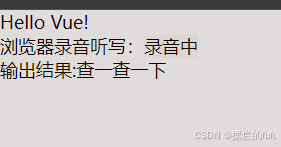
运行示例
总结
在引入过程成不用转为vue的引入方式,直接在public文件中引用即可,避免了很多麻烦.

Agent 垂直技术社区,欢迎活跃、内容共建。
更多推荐

 32
32 0
0- 0


 已为社区贡献1条内容

所有评论(0)