语音识别技术之FUNASR工具包
FUNASR是完整的语音识别解决方案,而paraformer-zh-streaming是其核心的中文流式识别模型,两者结合为中文语音识别提供了高效、准确的端到端解决方案。
FUNASR工具包中的语音识别(ASR)
基于2025年9月4日的最新技术发展,FUNASR工具包中各功能模块对应的最优大模型如下:
语音识别(ASR)
最优模型:Paraformer-large
-
流式版本:paraformer-zh-streaming (v2.0.4)4_1
-
非流式版本:paraformer-zh (大模型版本)4_2
-
性能表现:在中文识别准确率上超过98%,是公开测评中准确率最高的中文语音识别模型4_3
-
推理效率:GPU版本速度提升可达1200倍,支持长音频秒级处理4_4
-
模型输入格式s16le 整形 小端 16k 。f16le是浮点型 ffmpeg -f s32le -ar 16000 -ac 1 -i 3850167726_audiopre.pcm test.wav python如何把32转成16? import numpy as np # 假设 data 是包含 32 位浮点 PCM 的 bytes 对象 audio_f32 = np.frombuffer(data, dtype=np.float32) # 将浮点样本缩放到 int16 的动态范围 [-32768, 32767] audio_i16 = (audio_f32 * 32767).astype(np.int16) # 以小端字节序写入 s16le PCM 文件 with open(f"{self.ssrc}_audiopre.pcm", "ab") as f: f.write(audio_i16.tobytes())
语音端点检测(VAD)
最优模型:fsmn-vad4_5
-
功能:自动分割静音片段,输出有效音频片段的起始和结束时间
-
优势:与Paraformer模型完美集成,支持流式和非流式处理
-
应用:广泛用于长音频预处理和实时语音检测
标点恢复
最优模型:ct-punc4_5
-
功能:对识别出的文本自动添加标点符号
-
特点:专门针对中文文本优化,支持多种标点符号预测
-
集成性:与FUNASR语音识别链路无缝衔接
说话人验证与分离
最优模型组合:
-
特征提取:CAM++ 和 ERes2Net4_6
-
分离算法:使用K-均值或谱聚类算法4_6
-
多模态增强:结合音频和视觉信息的多模态说话人日志系统4_6
-
性能:在分割错误率(Diarization Error Rate)上有显著提升
多人对话语音识别
最优解决方案:Paraformer分角色语音识别4_7
-
模型:基于Paraformer架构的多人对话专用版本
-
功能:支持自动说话人分离和角色标记
-
应用场景:会议转录、多人访谈等复杂对话场景
情感识别
最优模型:emotion2vec_plus_large4_5
-
功能:支持多维度情感识别和情感嵌入提取
-
粒度:支持话语级别(utterance)的情感分析
-
输出:可提取情感嵌入特征或直接输出情感分类结果
paraformer-zh-streamin
paraformer-zh-streaming是FUNASR工具包中的流式中文语音识别模型,专门针对中文语音识别任务优化。2_3
核心特点
非自回归架构:Paraformer采用非自回归端到端模型,相比传统自回归模型,可以并行对整条句子输出目标文字,特别适合GPU并行推理。
实时流式处理:支持"边说边出文字"的效果,chunk_size配置为时,实时显示粒度为600ms,未来信息为300ms。
技术架构
paraformer-zh-streaming由五个核心部分组成:2_4
-
Encoder(编码器):可采用self-attention、conformer等网络结构
-
Predictor(预测器):预测目标文字个数并抽取声学向量
-
Sampler(采样器):生成含语义的特征向量
-
Decoder(解码器):双向建模,增强上下文理解
-
Loss function(损失函数):包含交叉熵、MWER和MAE优化目标
使用示例
from funasr import AutoModel # 流式识别配置 chunk_size = [0, 10, 5] # 600ms实时显示 model = AutoModel(model="paraformer-zh-streaming", model_revision="v2.0.4") # 处理音频流 for i in range(total_chunk_num): speech_chunk = speech[i*chunk_stride:(i+1)*chunk_stride] is_final = i == total_chunk_num - 1 res = model.generate(input=speech_chunk, cache=cache, is_final=is_final)
性能表现
中文识别准确率:在清晰的中文普通话测试集上,6万小时语料训练的FUNASR与68小时语料训练的Whisper V2的WER指标非常接近。2_5
推理效率:FUNASR搭载Paraformer-large等SOTA模型,GPU版本速度提升可达1200倍,支持长音频秒级处理。2_8
应用场景
-
实时语音转写:会议记录、直播字幕
-
智能语音助手:与大模型结合实现语音交互2_3
-
多人对话识别:支持说话人分离功能
-
长音频处理:支持任意时长音频输入,配合VAD模型使用2_7
总结:FUNASR是完整的语音识别解决方案,而paraformer-zh-streaming是其核心的中文流式识别模型,两者结合为中文语音识别提供了高效、准确的端到端解决方案。
环境搭建
模型下载
./hfd.sh funasr/paraformer-zh --local-dir ./funasr/paraformer-zh -x 8 -j 8 一共下载 ct-punc fsmn-vad paraformer-zh paraformer-zh-streaming
FUNASR基于Python3虚拟环境搭建指南
# 创建虚拟环境 python3 -m venv funasr-venv # 激活虚拟环境 # Linux/macOS: source funasr-venv/bin/activate # 验证Python版本 python --version
升级pip并安装基础工具
# 升级pip到最新版本 pip install --upgrade pip # 安装wheel(可选,用于编译包) pip install wheel setuptools
3. 安装FUNASR及核心依赖
# 安装FUNASR pip install funasr # 安装ModelScope(用于模型下载) pip install modelscope # 安装音频处理依赖(可选) pip install torchaudio pip install soundfile pip install librosa
4. 创建requirements.txt
# 从requirements.txt安装所有依赖
pip install -r requirements.txt
# FUNASR核心依赖
funasr>=1.2.0
modelscope>=1.9.0
# PyTorch CPU版本(指定索引)
--index-url https://download.pytorch.org/whl/cpu
torch>=2.0.0,<3.0.0
torchaudio>=2.0.0,<3.0.0
# 音频处理(从默认PyPI安装)
--index-url https://pypi.org/simple/
soundfile>=0.12.0
librosa>=0.9.0
# 数值计算
numpy>=1.21.0,<2.0.0
scipy>=1.7.0
# 网络和API
requests>=2.25.0
websockets>=8.0,<14.0 # Python 3.8兼容版本
# 实时音频处理
pyaudio>=0.2.11
sounddevice>=0.4.6
# Python版本兼容
backports.zoneinfo>=0.2.1; python_version<"3.9"纯CPU版本torchaudio
# 卸载已安装的版本(如果有) pip uninstall torch torchaudio # 安装CPU专用版本 pip install torch torchaudio --index-url https://download.pytorch.org/whl/cpu
websockets安装错误解决方案
ERROR: Could not find a version that satisfies the requirement websockets>=10.0
# 1. 先从PyTorch CPU索引安装PyTorch相关包 pip install torch torchaudio --index-url https://download.pytorch.org/whl/cpu # 2. 再从默认PyPI安装其他包 pip install websockets==13.1 # Python 3.8兼容的最新版本 pip install soundfile librosa requests pyaudio pip install backports.zoneinfo # Python 3.8需要
PyAudio安装错误解决方案
# 使用conda安装(如果有conda) conda install pyaudio # 或者使用wheel文件 pip install --only-binary=all pyaudio
在Python 3.8虚拟环境中解决Python.h编译问题
# Ubuntu/Debian
sudo apt-get install python3.8-dev
# 验证Python.h位置
find /usr -name "Python.h" 2>/dev/null | grep python3.8
测试
命令行测试
funasr +model=/home/jbj/openai/modle/funasr/speech_paraformer-large-vad-punc-spk_asr_nat-zh-cn +input=/home/jbj/openai/whisper/test/out6.wav
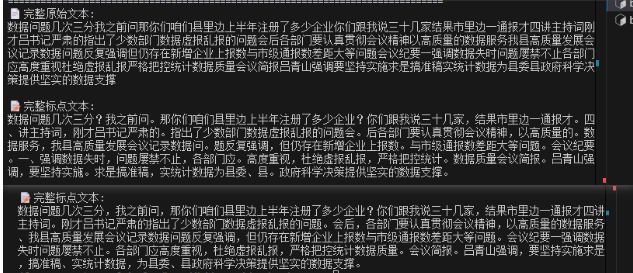
上面实时标点,下面最终一次标点。实时标点可以用作字幕,最终标点用于生成会议纪要。
python封装实验
#!/usr/bin/env python3
# -*- coding: utf-8 -*-
"""
FunASR 增强语音识别系统
======================

集成了以下功能:
- 语音活动检测 (VAD) - FSMN-VAD 模型
- 自动语音识别 (ASR) - Paraformer-zh 模型
- 连接型时间分类标点预测 (CT) - CT-PUNC 模型

"""

from funasr import AutoModel
import soundfile
import os
import numpy as np
from typing import List, Dict, Any, Optional, Tuple
import time

class EnhancedFunASR:
    """增强的 FunASR 语音识别系统,集成 VAD 和 CT 功能"""

    def __init__(self,
                 asr_model_path: str = "/home/jbj/openai/modle/funasr/paraformer-zh-streaming",
                 vad_model_path: str = "/home/jbj/openai/modle/funasr/fsmn-vad",
                 punc_model_path: str = "/home/jbj/openai/modle/funasr/ct-punc",
                 device: str = "cpu"):
        """
        初始化增强的 FunASR 系统

        Args:
            asr_model_path: ASR 模型路径
            vad_model_path: VAD 模型路径
            punc_model_path: 标点预测模型路径
            device: 设备类型 ("cpu" 或 "cuda")
        """
        self.asr_model_path = asr_model_path
        self.vad_model_path = vad_model_path
        self.punc_model_path = punc_model_path
        self.device = device

        # 模型实例
        self.asr_model = None
        self.vad_model = None
        self.punc_model = None

        # 流式配置参数
        self.chunk_size = [0, 50, 50]  # [0, 10, 5] 600ms, [0, 8, 4] 480ms
        self.encoder_chunk_look_back = 40  # encoder自注意力回望的chunk数量
        self.decoder_chunk_look_back = 10  # decoder交叉注意力回望的encoder chunk数量

        # VAD 配置参数
        self.vad_chunk_size = [0, 10, 5]  # VAD chunk 配置

        # 初始化模型
        self._load_models()

    def _load_models(self):
        """加载所有模型"""
        print("🔄 正在加载模型...")

        # 加载 ASR 模型
        print(f"📥 加载 ASR 模型: {self.asr_model_path}")
        try:
            self.asr_model = AutoModel(
                model=self.asr_model_path,
                device=self.device,
                disable_update=True, model_revision="v2.0.4"
            )
            print("✅ ASR 模型加载成功")
        except Exception as e:
            print(f"❌ ASR 模型加载失败: {e}")
            raise

        # 加载 VAD 模型
        print(f"📥 加载 VAD 模型: {self.vad_model_path}")
        try:
            self.vad_model = AutoModel(
                model=self.vad_model_path,
                device=self.device,
                disable_update=True, model_revision="v2.0.4"
            )
            print("✅ VAD 模型加载成功")
        except Exception as e:
            print(f"❌ VAD 模型加载失败: {e}")
            raise

        # 加载标点预测模型
        print(f"📥 加载标点预测模型: {self.punc_model_path}")
        try:
            self.punc_model = AutoModel(
                model=self.punc_model_path,
                device=self.device,
                disable_update=True, model_revision="v2.0.4"
            )
            print("✅ 标点预测模型加载成功")
        except Exception as e:
            print(f"❌ 标点预测模型加载失败: {e}")
            raise

        print("🎉 所有模型加载完成!")


    def detect_voice_activity(self, audio: np.ndarray) -> bool:
        """
        使用 VAD 模型检测语音活动

        Args:
            audio: 音频数据

        Returns:
            是否检测到语音活动
        """
        try:
            # VAD 模型处理整个音频段
            vad_result = self.vad_model.generate(input=audio)
            print(f"VAD 结果: {vad_result}")
            # [{'key': 'rand_key_S71IRz1THrHZp', 'value': [[400, 960], [1240, 2510], [2910, 5980]]}]
            # 解析 VAD 结果
            if vad_result and len(vad_result) > 0:
                # VAD 结果通常包含时间段信息
                # 检查是否有语音段
                for segment in vad_result:
                    if isinstance(segment, dict):
                        # 检查是否有语音标记
                        if 'text' in segment and segment['text']:
                            return True
                        # 或者检查时间段信息
                        if 'start' in segment and 'end' in segment:
                            # 如果有有效的时间段,认为有语音
                            if segment['end'] > segment['start']:
                                return True
                    elif isinstance(segment, list) and len(segment) > 0:
                        # 如果是时间段列表
                        return True

                # 如果有任何结果,可能表示有语音
                return len(vad_result) > 0

            return False

        except Exception as e:
            print(f"❌ VAD 检测失败: {e}")
            # 如果 VAD 失败,默认认为有语音
            return True

    def recognize_speech(self, audio: np.ndarray, cache: Dict = None, is_final: bool = False) -> List[Dict]:
        """
        使用 ASR 模型进行语音识别

        Args:
            audio: 音频数据
            cache: ASR 缓存
            is_final: 是否为最终块

        Returns:
            ASR 识别结果
        """
        if cache is None:
            cache = {}

        try:
            asr_result = self.asr_model.generate(
                input=audio,
                cache=cache,
                is_final=is_final,
                chunk_size=self.chunk_size,
                encoder_chunk_look_back=self.encoder_chunk_look_back,
                decoder_chunk_look_back=self.decoder_chunk_look_back
            )
            return asr_result
        except Exception as e:
            print(f"❌ ASR 识别失败: {e}")
            return []

    def add_punctuation(self, text: str) -> str:
        """
        使用 CT 模型为文本添加标点

        Args:
            text: 原始文本

        Returns:
            添加标点后的文本
        """
        if not text or not text.strip():
            return text

        try:
            punc_result = self.punc_model.generate(input=text)
            print(f"标点预测结果: {punc_result}")
            #[{'key': 'rand_key_7zOfbr6CZYh3q',
            # 'text': '少一点。但是大家只要去年做,在这儿的综合拿到的钱都会比去年多。但是我们。'
            # , 'punc_array': tensor([1, 1, 3, 1, 1, 1, 1, 1, 1, 1, 1, 2, 1, 1, 1, 1, 1, 1, 1, 1, 1, 1, 1, 1, 1, 1, 1, 3, 1, 1, 1, 2])}]
            if punc_result and len(punc_result) > 0:
                # 提取标点预测结果
                if isinstance(punc_result[0], dict) and 'text' in punc_result[0]:
                    return punc_result[0]['text']
                elif isinstance(punc_result[0], str):
                    return punc_result[0]
                else:
                    return str(punc_result[0])
            return text
        except Exception as e:
            print(f"❌ 标点预测失败: {e}")
            return text

    def process_audio_chunk(self, audio: np.ndarray,
                          asr_cache: Dict = None,
                          is_final: bool = False,
                          enable_vad: bool = True,
                          enable_punc: bool = True) -> Dict[str, Any]:
        """
        处理单个音频块,集成 VAD、ASR 和 CT 功能

        Args:
            audio: 音频数据
            asr_cache: ASR 缓存
            is_final: 是否为最终块
            enable_vad: 是否启用 VAD
            enable_punc: 是否启用标点预测

        Returns:
            处理结果字典
        """
        result = {
            'vad_result': None,
            'asr_result': None,
            'text': '',
            'text_with_punc': '',
            'has_speech': False,
            'processing_time': 0
        }

        start_time = time.time()

        # 1. VAD 检测(如果启用)
        if enable_vad:
            has_speech = self.detect_voice_activity(audio)
            result['has_speech'] = has_speech
            result['vad_result'] = has_speech  # 简化的 VAD 结果

            # 如果没有检测到语音,直接返回
            if not has_speech:
                result['processing_time'] = time.time() - start_time
                return result
        else:
            result['has_speech'] = True  # 如果不使用 VAD,假设都有语音

        # 2. ASR 识别(仅在检测到语音时进行)
        if result['has_speech']:
            asr_result = self.recognize_speech(audio, asr_cache, is_final)
            result['asr_result'] = asr_result
            print(f"ASR 结果: {asr_result}")
            #ASR 结果: [{'key': 'rand_key_1t9EwL56nGisi', 'text': '然后我再说一下我们这个议程哈就是我会呃说个几分钟就是我们这一年'}]
            # 提取文本
            if asr_result and len(asr_result) > 0:
                if isinstance(asr_result[0], dict) and 'text' in asr_result[0]:
                    text = asr_result[0]['text']
                elif isinstance(asr_result[0], str):
                    text = asr_result[0]
                else:
                    text = str(asr_result[0])

                result['text'] = text

                # 3. 标点预测(如果启用且有文本)
                if enable_punc and text.strip():
                    text_with_punc = self.add_punctuation(text)
                    result['text_with_punc'] = text_with_punc
                else:
                    result['text_with_punc'] = text

        result['processing_time'] = time.time() - start_time
        return result


def main():
    """主函数:演示增强的 FunASR 系统"""

    # 初始化增强的 FunASR 系统
    print("🚀 初始化增强的 FunASR 系统...")
    funasr = EnhancedFunASR()

    # 读取音频文件
    wav_file = "/home/jbj/openai/whisper/test/out5.wav"
    print(f"📁 读取音频文件: {wav_file}")

    try:
        speech, sample_rate = soundfile.read(wav_file)
        print(f"✅ 音频加载成功 - 采样率: {sample_rate}Hz, 长度: {len(speech)/sample_rate:.2f}秒")
    except Exception as e:
        print(f"❌ 音频文件读取失败: {e}")
        return

    # 确保音频是单声道且采样率为16kHz
    if len(speech.shape) > 1:
        speech = speech[:, 0]  # 取第一个声道 speech[i][0]
    if sample_rate != 16000:
        print(f"⚠️  音频采样率为 {sample_rate}Hz,建议使用 16kHz")

    # 计算chunk步长
    chunk_stride = funasr.chunk_size[1] * 960  # 600ms对应的采样点数
    total_chunk_num = int((len(speech) - 1) / chunk_stride + 1)

    print(f"📊 音频总长度: {len(speech)/16000:.2f}秒")
    print(f"📊 分割为 {total_chunk_num} 个chunk进行处理")
    print(f"📊 每个chunk长度: {chunk_stride/16000:.2f}秒")

    # 初始化缓存
    asr_cache = {}

    # 存储所有结果
    all_results = []
    total_text = ""
    total_text_with_punc = ""

    print("\n🔄 开始逐chunk处理...")
    print("=" * 80)

    # 逐chunk处理
    for i in range(total_chunk_num):
        # 提取音频块
        start_idx = i * chunk_stride
        end_idx = min((i + 1) * chunk_stride, len(speech))
        speech_chunk = speech[start_idx:end_idx]

        # 确保音频块长度一致(填充零或截断)
        if len(speech_chunk) < chunk_stride:
            # 填充零到标准长度
            padded_chunk = np.zeros(chunk_stride, dtype=speech.dtype)
            padded_chunk[:len(speech_chunk)] = speech_chunk #将前 :len(speech_chunk) 个元素用原块数据覆盖。
            speech_chunk = padded_chunk

        is_final = i == total_chunk_num - 1

        print(f"\n📝 处理 Chunk {i+1}/{total_chunk_num} (长度: {len(speech_chunk)/16000:.2f}秒)")

        # 处理音频块 - 现在启用 VAD 功能
        result = funasr.process_audio_chunk(
            audio=speech_chunk,
            asr_cache=asr_cache,
            is_final=is_final,
            enable_vad=True,  # 启用 VAD
            enable_punc=True
        )

        all_results.append(result)

        # 显示结果
        print(f"⏱️  处理时间: {result['processing_time']:.3f}秒")
        print(f"🎤 检测到语音: {'是' if result['has_speech'] else '否'}")

        if result['text']:
            print(f"📄 原始文本: {result['text']}")
            total_text += result['text']

        if result['text_with_punc']:
            print(f"📝 标点文本: {result['text_with_punc']}")
            total_text_with_punc += result['text_with_punc']

        if not result['has_speech']:
            print("🔇 未检测到语音,跳过ASR处理")


    # 显示最终结果
    print("\n" + "=" * 80)
    print("🎉 处理完成!最终结果:")
    print("=" * 80)
    print(f"📄 完整原始文本:\n{total_text}")
    print(f"\n📝 完整标点文本:\n{total_text_with_punc}")

    # 统计信息
    speech_chunks = sum(1 for r in all_results if r['has_speech'])
    total_processing_time = sum(r['processing_time'] for r in all_results)

    print(f"\n📊 统计信息:")
    print(f"   总chunk数: {total_chunk_num}")
    print(f"   有语音chunk数: {speech_chunks}")
    print(f"   语音占比: {speech_chunks/total_chunk_num*100:.1f}%")
    print(f"   总处理时间: {total_processing_time:.3f}秒")
    print(f"   平均每chunk处理时间: {total_processing_time/total_chunk_num:.3f}秒")
    # 3. 标点预测(如果启用且有文本)
    if True and total_text.strip():
        total_text_punc = funasr.add_punctuation(total_text)
        print(f"\n📝 完整标点文本:\n{total_text_punc}")


if __name__ == "__main__":
    main()
学习社区
https://github.com/0voice

Agent 垂直技术社区,欢迎活跃、内容共建。
更多推荐
 8
8 0
0- 0


 已为社区贡献8条内容

所有评论(0)