安装open claw 报错 CategoryInfo : NotSpecified: (npm error code 128:String) [], RemoteException
在windows安装open claw时报错CategoryInfo: NotSpecified: (npm error code 128:String) [], RemoteException先检查了一下node的版本确认是>22,然后找到node的日志报错发给AI,问题是没有配置github的公钥。
·
在windows安装open claw时报错CategoryInfo : NotSpecified: (npm error code 128:String) [], RemoteException
先检查了一下node的版本确认是>22,然后找到node的日志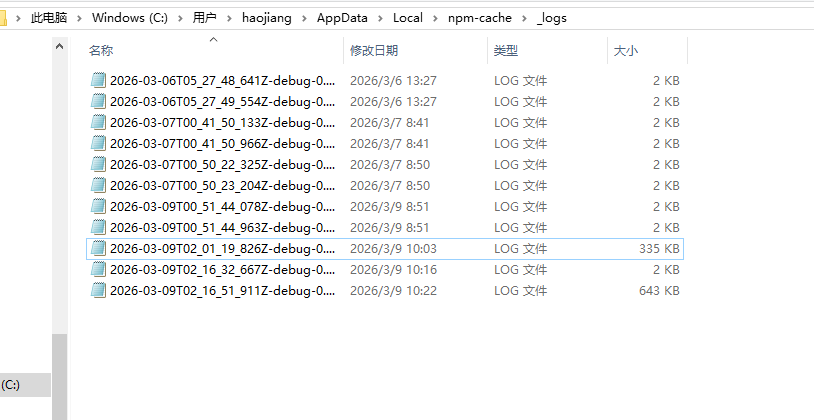
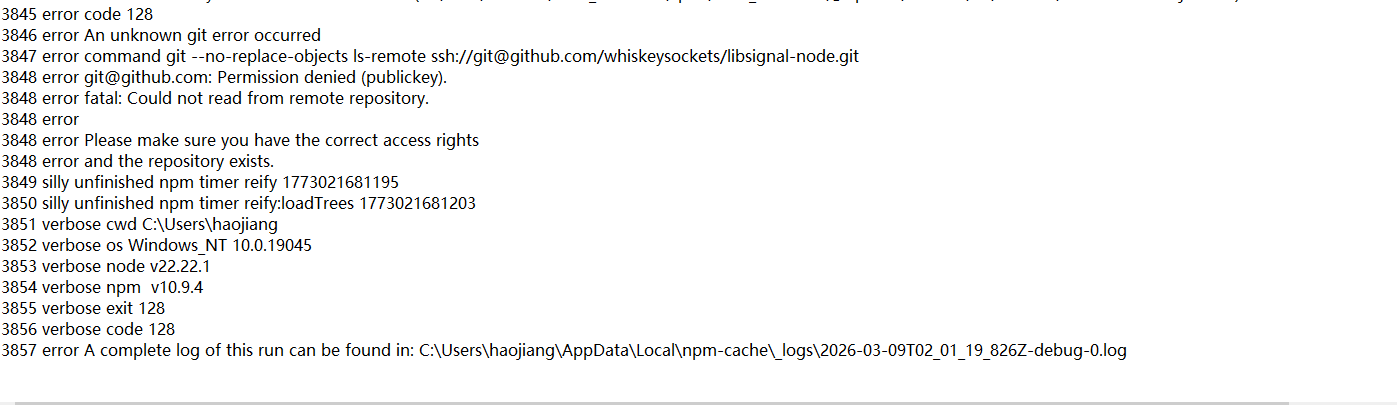
报错发给AI,问题是没有配置github的公钥。
配置公钥
1、检查并生成 SSH 密钥
# 1. 检查是否有现有密钥
ls -al ~/.ssh/

# 如果没有 id_rsa 和 id_rsa.pub 文件,需要生成
# 2. 生成新的 SSH 密钥
ssh-keygen -t rsa -b 4096 -C "您的邮箱地址"

# 提示 "Enter file in which to save the key (/c/Users/您的用户名/.ssh/id_rsa):" 时直接按回车
# 提示 "Enter passphrase" 时直接按回车(不设置密码)或设置一个密码
- 启动 SSH 代理并添加密钥
# 1. 启动 SSH 代理
eval $(ssh-agent -s)
# 应该看到 "Agent pid xxxx"

# 2. 添加 SSH 私钥到代理
ssh-add ~/.ssh/id_rsa
# 如果设置了密码,会提示输入
- 复制公钥并添加到 GitHub
# 1. 查看并复制公钥
cat ~/.ssh/id_rsa.pub
# 会显示类似这样的内容:
# ssh-rsa AAAAB3NzaC1yc2EAAAADAQABAAACAQ.... 您的邮箱地址
- 测试
ssh -T git@github.com
应该看到
Hi 您的用户名! You've successfully authenticated, but GitHub does not provide shell access.
启动openclaw
启动命令
openclaw gateway --verbose

Agent 垂直技术社区,欢迎活跃、内容共建。
更多推荐

 1
1 0
0- 0


 已为社区贡献1条内容

所有评论(0)