基于 openclaw + Notion 的工作日报/周报/月报自动化管理系统
基于 openclaw + Notion 的工作日报/周报/月报自动化管理系统
通过 OpenClaw 定时调度,自动收集 Git 提交记录与 Notion 活动日志,利用 Claude Code Skills 生成结构化报告并写入 Notion 数据库。全程无需人工干预,跨平台开箱即用。
项目地址:auto-daily-report
如果觉得有帮助,欢迎 ⭐ Star 支持一下!
功能特性
- 日报自动生成 — 每日收集 Git 提交 + Notion 活动记录,生成结构化日报
- 周报自动聚合 — 汇总本周日报,跨天去重分析,生成周报
- 月报自动汇总 — 汇总本月周报,里程碑识别,生成月报
- 配置集中管理 — 单一
config.json管理所有 Notion 数据库 ID,一键同步到 Skill 文件 - OpenClaw 定时调度 — 通过消息平台(WhatsApp / Telegram / iMessage)触发,支持自然语言设置定时任务,跨平台运行
- 日志自动轮转 — 保留最近 30 天日志,自动清理
效果展示
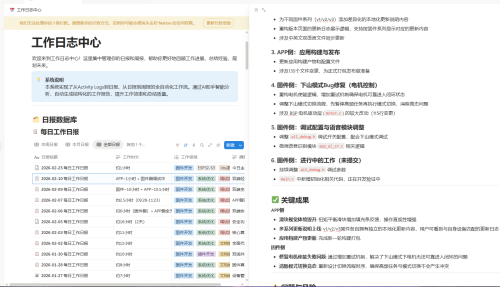
▲ 自动生成的结构化日报
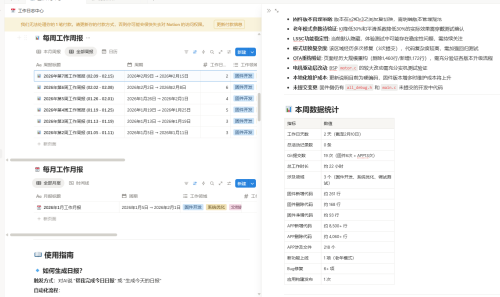
▲ Notion 数据库中的报告记录
系统要求
| 依赖 | 说明 |
|---|---|
| Claude Code v2.x+ | AI 报告生成引擎 |
| OpenClaw | 定时调度 + 自主执行代理 |
| Git | 提交记录收集 |
| Python 3 | JSON 解析(macOS/Linux 自带) |
| jq(可选) | JSON 解析加速,未安装时自动回退到 Python |
| Notion 账号 | 数据源 + 报告输出目标 |
Notion MCP Server 配置
Claude Code 需要配置 Notion MCP Server 才能读写 Notion 数据库。编辑 ~/.claude/.mcp.json,添加:
{
  "mcpServers": {
    "notion": {
      "command": "npx",
      "args": ["-y", "@notionhq/notion-mcp-server"],
      "env": {
        "OPENAPI_MCP_HEADERS": "{\"Authorization\":\"Bearer <你的 Notion Integration Token>\",\"Notion-Version\":\"2022-06-28\"}"
      }
    }
  }
}
获取 Token: 前往 Notion Integrations 创建 Integration,获取 Internal Integration Token,并将其关联到目标数据库页面。
快速开始
1. 克隆项目
git clone https://github.com/xiaozhangxuezhang/auto-daily-report.git
cd auto-daily-report
2. 编辑配置文件
cp config.json config.json.bak  # 备份默认配置
vim config.json                 # 编辑为你的实际配置
将 config.json 中的仓库路径和 Notion 数据库 ID 替换为你自己的值(详见 配置说明)。
3. 运行自检 & 配置同步
bash test.sh
该命令会:
- 将
config.json中的数据库 ID 同步到所有 Skill 模板文件 - 验证配置文件、脚本、Skill 文件等是否完整可用
- 检查 Claude CLI 等依赖是否就绪
全部通过后输出 全部检查通过!。
4. 配置 OpenClaw 定时任务
在 OpenClaw 中设置定时调度(通过消息平台发送自然语言指令):
每周一到周六晚上 10 点,执行 `/daily-report`技能
每周日晚上 10 点,执行 `/weekly-report`技能
每月最后一天晚上 11 点,执行 `/monthly-report`技能
OpenClaw 会自动将自然语言转换为定时任务并执行。
配置说明
所有配置集中在 config.json 中管理:
{
  "github": {
    "repos": ["/Users/你的用户名/Documents/GitHub/你的项目"]
  },
  "notion": {
    "databases": {
      "activity_logs": "你的活动记录数据库ID",
      "daily_report": "你的日报数据库ID",
      "weekly_report": "你的周报数据库ID",
      "monthly_report": "你的月报数据库ID"
    }
  }
}
配置字段说明
| 字段 | 说明 |
|---|---|
github.repos | Git 仓库路径列表,支持本地绝对路径和远程 URL(远程仓库自动 clone 到.repo-cache/) |
notion.databases.* | 4 个 Notion 数据库 ID(activity_logs / daily_report / weekly_report / monthly_report) |
如何获取 Notion 数据库 ID: 打开 Notion 数据库页面,URL 中
notion.so/后、?v=前的 32 位字符串即为数据库 ID。
项目结构
auto-daily-report/
├── config.json                          # 集中配置文件(数据库 ID、仓库路径等)
├── test.sh                              # 自检 + 配置同步脚本
├── .claude/
│   └── skills/
│       ├── daily-report/
│       │   ├── SKILL.md                 # 日报生成 Skill(由模板生成,勿手动编辑)
│       │   └── SKILL.md.tpl             # 日报 Skill 模板(含占位符)
│       ├── weekly-report/
│       │   ├── SKILL.md                 # 周报生成 Skill
│       │   └── SKILL.md.tpl             # 周报 Skill 模板
│       └── monthly-report/
│           ├── SKILL.md                 # 月报生成 Skill
│           └── SKILL.md.tpl             # 月报 Skill 模板
├── scripts/
│   └── gather-git-logs.sh               # Git 提交日志收集
└── logs/                                # 执行日志(自动生成)
工作原理
┌─────────────────────────────────────────────────────────┐
│                      OpenClaw                            │
│  ┌──────────┐  ┌──────────┐  ┌───────────┐             │
│  │ 日报任务  │  │ 周报任务  │  │ 月报任务  │             │
│  │ 周一~六   │  │ 周日     │  │ 月末      │             │
│  │ 22:00    │  │ 22:00    │  │ 23:00     │             │
│  └────┬─────┘  └────┬─────┘  └─────┬─────┘             │
└───────┼──────────────┼──────────────┼───────────────────┘
        │              │              │
        ▼              ▼              ▼
┌─────────────────────────────────────────────────────────┐
│     claude -p "/daily-report" | "/weekly-report" | ...   │
│     OpenClaw 在项目目录下自动执行 Claude CLI              │
└────────────────────────┬────────────────────────────────┘
                         │
                         ▼
┌─────────────────────────────────────────────────────────┐
│                Claude Code Skills                        │
│                                                          │
│  /daily-report          /weekly-report    /monthly-report│
│  ├─ gather-git-logs.sh  ├─ 查询日报DB     ├─ 查询周报DB  │
│  ├─ 查询 Activity Logs  ├─ 跨天去重分析   ├─ 里程碑识别  │
│  ├─ 生成结构化日报       ├─ 生成周报       ├─ 生成月报    │
│  └─ 写入日报 DB          └─ 写入周报 DB    └─ 写入月报 DB │
└─────────────────────────────────────────────────────────┘
使用方式
在 Claude Code 中直接使用 Skill
在项目目录下启动 Claude Code,直接输入 Skill 命令:
> /daily-report    # 生成今日日报
> /weekly-report   # 生成本周周报
> /monthly-report  # 生成本月月报
通过 CLI 非交互模式执行
cd /path/to/auto-daily-report
claude -p "/daily-report"
claude -p "/weekly-report"
claude -p "/monthly-report"
运行系统自检
bash test.sh
自检涵盖配置同步、文件完整性、依赖可用性等检查。
配置同步机制
本项目采用模板占位符机制管理 Skill 文件中的配置值:
config.json  ──→  test.sh (sync_config)  ──→  SKILL.md.tpl  ──→  SKILL.md
  (源数据)          (sed 替换)                  (模板)            (最终文件)
模板占位符列表
| 占位符 | 来源 | 用于 |
|---|---|---|
{{PROJECT_DIR}} | 脚本运行时自动获取 | daily-report |
{{ACTIVITY_LOGS_DB_ID}} | config.json → notion.databases.activity_logs | daily-report |
{{DAILY_REPORT_DB_ID}} | config.json → notion.databases.daily_report | daily-report, weekly-report |
{{WEEKLY_REPORT_DB_ID}} | config.json → notion.databases.weekly_report | weekly-report, monthly-report |
{{MONTHLY_REPORT_DB_ID}} | config.json → notion.databases.monthly_report | monthly-report |
工作流程
- 编辑
config.json中的数据库 ID - 运行
bash test.sh,自动将配置同步到.claude/skills/*/SKILL.md - Skill 文件即可被 Claude Code 正确调用
注意:
SKILL.md由模板自动生成,请勿手动编辑。如需修改 Skill 逻辑,请编辑对应的SKILL.md.tpl模板文件。
定时调度
通过 OpenClaw 设置定时任务,无需手动配置 cron 或 launchd:
| 报告类型 | 触发时间 | 执行命令 |
|---|---|---|
| 日报 | 周一至周六 22:00 | claude -p "/daily-report" |
| 周报 | 周日 22:00 | claude -p "/weekly-report" |
| 月报 | 月末 23:00 | claude -p "/monthly-report" |
OpenClaw 支持自然语言设置定时任务,也可通过 cron 表达式精确控制。详见 OpenClaw 文档。
日志管理
执行日志保存在 logs/ 目录:
logs/
├── daily-report-20260225.log        # 日报执行日志
├── weekly-report-20260223.log       # 周报执行日志
└── monthly-report-20260228.log      # 月报执行日志
故障排查
查看最近执行日志
tail -50 logs/daily-report-$(date +%Y%m%d).log
常见问题排查表
| 现象 | 可能原因 | 解决方法 |
|---|---|---|
test.sh 报 “配置文件不存在” | config.json 缺失 | 确认项目根目录存在config.json |
Skill 文件中仍有{{xxx}} 占位符 | 未运行test.sh 同步 | 执行bash test.sh |
| Claude CLI 启动失败 | Claude 未安装或路径错误 | 运行 which claude 确认 CLI 已安装且在 PATH 中 |
| Notion 写入失败 | MCP Server 未配置或 Token 无效 | 检查~/.claude/.mcp.json 配置 |
| OpenClaw 定时任务未触发 | OpenClaw 服务未运行 | 确认 OpenClaw 进程正常运行,检查调度配置 |
常见问题
Q: 修改了 config.json 后需要做什么?
运行 bash test.sh,它会自动将新配置同步到所有 Skill 文件。
Q: 可以同时监控多个 Git 仓库吗?
可以。在 config.json 的 github.repos 数组中添加多个路径即可,支持本地路径和远程 URL 混用:
{
  "github": {
    "repos": [
      "/Users/me/project-a",
      "/Users/me/project-b",
      "https://github.com/me/project-c"
    ]
  }
}
Q: 如何自定义报告的触发时间?
在 OpenClaw 中重新设置定时任务即可,支持自然语言描述(如"每天晚上 9 点")或 cron 表达式。
Q: 没有安装 jq 会影响使用吗?
不会。test.sh 优先使用 jq 解析 JSON,未安装时自动回退到 Python 3(macOS 自带)。
Q: 如何自定义 Skill 的报告内容和格式?
编辑 .claude/skills/*/SKILL.md.tpl 模板文件,修改报告生成逻辑,然后运行 bash test.sh 重新同步。
Q: 远程仓库的提交记录如何收集?
gather-git-logs.sh 会自动将远程 URL clone 到 .repo-cache/ 目录,后续执行时自动 git pull 更新。
License
MIT

Agent 垂直技术社区,欢迎活跃、内容共建。
更多推荐
 10
10 0
0- 0


 已为社区贡献3条内容

所有评论(0)