openclaw 配置多个模型后重新修改不生效,报HTTP 401 authentication_error
现象:
openclaw vim /root/.openclaw/openclaw.json多次修改models的模型地址、名称、api-key 和 agents后报 HTTP 401 authentication_error
原因:配置文件没修改对,还有专用的agent配置文件
解决:
1、vim ~/.openclaw/agents/main/agent/models.json
增加或者修改模型提供者的模型地址、名称、api-key
2、vim /root/.openclaw/openclaw.json
只修改agents部分和models.json里的模型提供者对应,
可能报错Error: No API key found for provider "xxxx". Auth store: /root/.openclaw/agents/main/agent/auth-profiles.json (agentDir: /root/.openclaw/agents/main/agent). Configure auth for this agent (openclaw agents add <id>) or copy auth-profiles.json from the main agentDir.
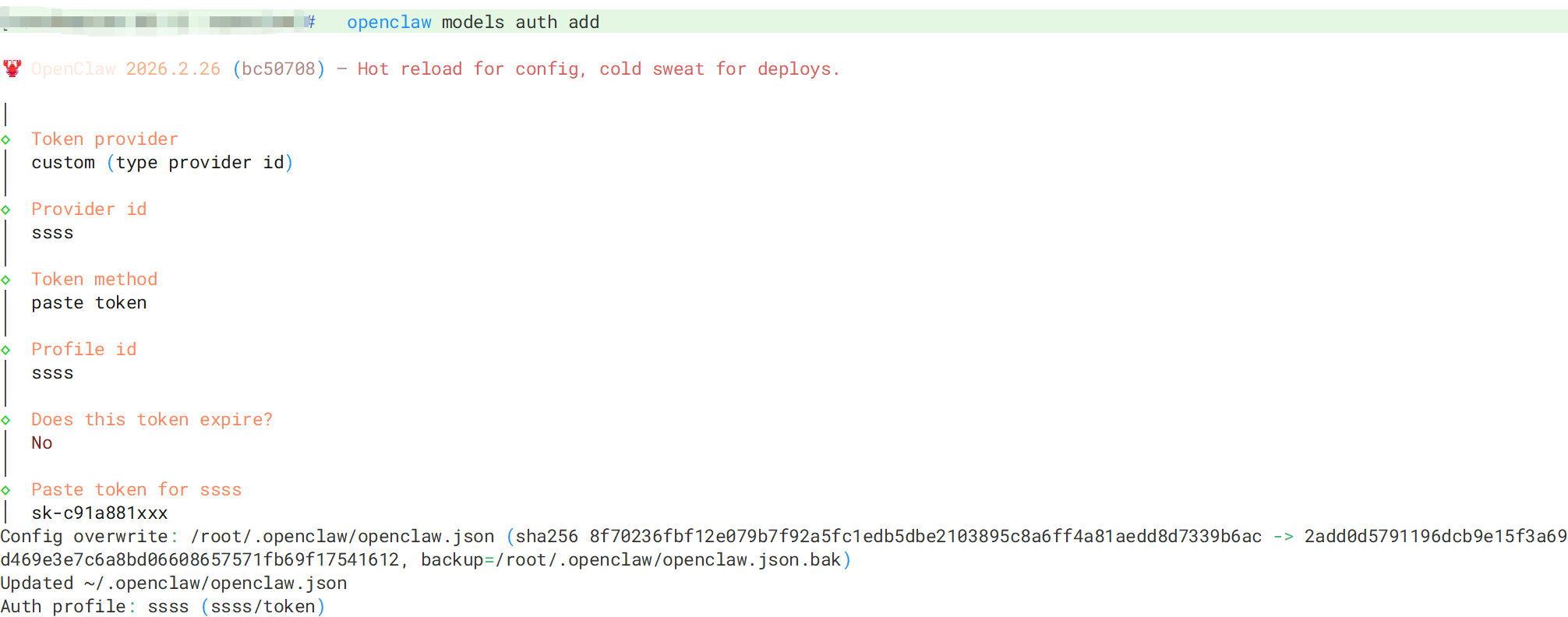
执行 openclaw models auth add 交互式输入模型提供者名称(profile id注意去掉多余的:xxxx),和对应的apikey,完成后就可以访问了。
下面python将本地12345端口转发到TARGET_URL,可以将openclaw配置文件配成127.0.0.1:12345,用来确认配置文件是否按预期工作,也可以调试接口信息定位问题,会打印请求头、请求体,响应头、响应体
from flask import Flask, request, Response
import requests

app = Flask(__name__)

TARGET_URL = "http://10.10.xxxx:xxxx"

@app.route('/<path:path>', methods=['GET', 'POST', 'PUT', 'DELETE'])
def proxy(path):
    print(f"\n--- Request Received ---")
    print(f"Method: {request.method}")
    print(f"Path: {path}")
    print(f"Headers: {dict(request.headers)}")
    print(f"Body: {request.get_data()}")

    # 转发请求
    url = f"{TARGET_URL}/{path}"
    # 过滤掉一些不能转发的头
    headers = {key: value for key, value in request.headers if key.lower() not in ['host', 'content-length']}

    resp = requests.request(
        method=request.method,
        url=url,
        headers=headers,
        data=request.get_data(),
        params=request.args
    )

    print(f"Response Status: {resp.status_code}")
    print(f"Response Body: {resp.text[:200]}") # 只打印前200字符

    return Response(resp.content, status=resp.status_code, content_type=resp.headers.get('Content-Type'))

if __name__ == '__main__':
    app.run(port=12345, debug=False)
Agent 垂直技术社区,欢迎活跃、内容共建。
更多推荐


 3
3 0
0- 0


 已为社区贡献2条内容

所有评论(0)