【agent】Function Calling、MCP、skill
文章目录
25年的项目用到了function calling sft+MCP,当时记录了项目里的用法和bug。
26年skill已经火了。追加了skill相关的记录。
好用的skills:https://github.com/wanshuiyin/Auto-claude-code-research-in-sleep/blob/main
Function Calling微调
项目整理了Qwen2.5和deepseek-V3的工具调用模板。
json schema
from transformers.utils import get_json_schema
get_json_schema(get_current_weather)
get_current_weather是一个函数,需要规范注释,如下(函数描述、参数描述、返回值描述):
def get_current_temperature(location: str, unit: str = "celsius"):
    """
    Gets the temperature at a given location.

    Args:
        location: The location to get the temperature for, in the format "city, state, country"
    	unit: The unit to return the temperature in. Defaults to "celsius".
    Returns:
        the temperature, the location, and the unit in a dict
    """
    return {
        "temperature": 25.9,
        "location": "San Francisco, CA, USA",
        "unit": "celsius",
    }
json schema格式:
{
   "type": "function",
   "function": {
       "name": "get_current_temperature",
       "description": "Gets the temperature at a given location.",
       "parameters": {
           "type": "object",
           "properties": {
               "location": {
                   "type": "string",
                   "description": 'The location to get the temperature for, in the format "city, state, country"',
               },
               "unit": {
                   "type": "string",
                   "enum": ["celsius", "fahrenheit"],
                   "description": 'The unit to return the temperature in. Defaults to "celsius".',
               },
           },
           "required": ["location"],
       },
   },
}
Qwen2.5
可以通过apply_chat_template生成模板。但是需要注意add_generation_prompt=False。
如果是True,则为聊天模板,确保llm后续会继续输出,所以prompt是以<|im_start|>assistant结尾的。
但是我们训练的时候希望直接终止,是以<|im_end|>结束的。
from transformers import AutoTokenizer

model_path = "/data1/ztshao/pretrained_models/Qwen/Qwen2.5-7B-Instruct"  # 模型路径
model = 'Qwen2.5'

# 函数要有规范注释
def get_current_temperature(location: str) -> float:
    """
    获取某个位置的当前温度。

    Args:
        location: 获取温度的位置,格式为"城市,国家"
    Returns:
        以浮点数float形式显示指定位置的当前温度(采用指定单位)。
    """
    return 22.

tool_call = {"name": "get_current_temperature", "arguments": {"location": "法国巴黎"}}
messages = [
  {"role": "system", "content": "您是一个响应天气查询的机器人。"},
  {"role": "user", "content": "巴黎现在的温度是多少?"},
  {"role": "assistant", "tool_calls": [{"type": "function", "function": tool_call}]},
]


tokenizer = AutoTokenizer.from_pretrained(model_path, trust_remote_code=True)
inputs = tokenizer.apply_chat_template(messages,
                                       tools=[get_current_temperature],
                                       add_generation_prompt=False,
                                       tokenize=False,
                                       tools_in_user_message=False)

file = f'prompt_{model}.txt'
with open(file, 'w') as fp:
    fp.write(inputs)
参数解释:
- tools传入候选函数列表;
- add_generation_prompt=False,表示不在prompt末尾添加提示LLM继续生成文本的token;
- tokenize=False表示返回token字符串,如果tokenize=True表示返回token id列表;
- tools_in_user_message=False表示候选工具列表不在传入的messages信息中,这里是通过tools=[get_current_temperature]传入候选工具列表的。
DeepSeek-V3
只有685B的模型,我没有下载下来测试,拿tokenizer测了下prompt。
但是调用存在两个问题。DeepSeek-V3的template的jinja2代码里有一段:
{%- if message['role'] == 'assistant' and message['content'] is none %}
    {%- set ns.is_tool = false -%}
    {%- for tool in message['tool_calls'] %}
        {%- if not ns.is_first %}
            {{ '<|Assistant|><|tool calls begin|><|tool call begin|>' + tool['type'] + '<|tool sep|>' + tool['function']['name'] + '\n```json\n' + tool['function']['arguments'] + '\n```<|tool call end|>' }}
            {%- set ns.is_first = true -%}
        {%- else %}
            {{ '\n<|tool call begin|>' + tool['type'] + '<|tool sep|>' + tool['function']['name'] + '\n```json\n' + tool['function']['arguments'] + '\n```<|tool call end|>' }}
            {{ '<|tool calls end|><|end of sentence|>' }}
        {%- endif %}
    {%- endfor %}
{%- endif %}
存在两个问题:
message必须有键content。所以messages要添加键值对"content": None- 直接拼贴了
tool['function']['arguments']和其他str。但是tool['function']['arguments']是字典,直接拼贴会报错。
个人感觉是jinja2代码有问题。我看了下qwen的处理,是把字典arguments转换为了json字符串:{{- tool_call.arguments | tojson }}。
工具调用SFT
Alpaca的ShareGPT
Alpaca数据集格式貌似不支持工具调用。可以用ShareGPT数据集格式。
ShareGPT数据集格式
ShareGPT数据集样例
ShareGPT工具调用SFT格式
[
  {
    "conversations": [
      {
        "from": "human",
        "value": "人类指令"
      },
      {
        "from": "function_call",
        "value": "工具参数"
      }
    ],
    "system": "系统提示词",
    "tools": "工具描述"
  }
前文例子转换为ShareGPT格式:
tool_call = {"name": "get_current_temperature", "arguments": {"location": "巴黎,法国"}}
from transformers.utils import get_json_schema
schema = get_json_schema(get_current_temperature)
candidate_tools = [schema]
share = {
    "conversations":[
        {
            "from": "human",
            "value": "巴黎现在的温度是多少?"
        },
        {
            "from": "function_call",
            "value": json.dumps(tool_call, ensure_ascii=False)
        }
    ],
    "system": "您是一个响应天气查询的机器人。",
    "tools": json.dumps(candidate_tools, ensure_ascii=False)
}
非llama-factory的朴素SFT
对于非llama-factory的朴素sft来说(以Qwen2.5为例)
输入:system+user+特殊token <im_start>assistant引导llm回复
输出:assistant,但是无<im_start>assistant(因为已经在输入部分了)。
ReACT式工具调用训练
参考
如:
{
	"from": "gpt",
	"value": "Thought:我要调用AI服务器网页控制的打开接口打开案例展示页面\nAction: open_web\nAction Input: {"name":"案例展示"}\nObservation:正在通过open_web打开案例展示页面"
},
Ollama导入工具调用模型
qwen2.5的模板
注意,原生模板不能直接放到./Modelfile中,因为ollama解析Modelfile的时候不能识别换行符。
直接用ollama官方重写的模板。
Modelfile参考写法:
FROM ./Qwen2.5-7B-Instruct.gguf

TEMPLATE """
...
"""
其中...用官方给的模板替代。如:
FROM ./Qwen2.5-7B-Instruct.gguf

TEMPLATE """
{{- if .Messages }}
{{- if or .System .Tools }}<|im_start|>system
{{- if .System }}
{{ .System }}
{{- end }}
{{- if .Tools }}

# Tools

You may call one or more functions to assist with the user query.

You are provided with function signatures within <tools></tools> XML tags:
<tools>
{{- range .Tools }}
{"type": "function", "function": {{ .Function }}}
{{- end }}
</tools>

For each function call, return a json object with function name and arguments within <tool_call></tool_call> XML tags:
<tool_call>
{"name": <function-name>, "arguments": <args-json-object>}
</tool_call>
{{- end }}<|im_end|>
{{ end }}
{{- range $i, $_ := .Messages }}
{{- $last := eq (len (slice $.Messages $i)) 1 -}}
{{- if eq .Role "user" }}<|im_start|>user
{{ .Content }}<|im_end|>
{{ else if eq .Role "assistant" }}<|im_start|>assistant
{{ if .Content }}{{ .Content }}
{{- else if .ToolCalls }}<tool_call>
{{ range .ToolCalls }}{"name": "{{ .Function.Name }}", "arguments": {{ .Function.Arguments }}}
{{ end }}</tool_call>
{{- end }}{{ if not $last }}<|im_end|>
{{ end }}
{{- else if eq .Role "tool" }}<|im_start|>user
<tool_response>
{{ .Content }}
</tool_response><|im_end|>
{{ end }}
{{- if and (ne .Role "assistant") $last }}<|im_start|>assistant
{{ end }}
{{- end }}
{{- else }}
{{- if .System }}<|im_start|>system
{{ .System }}<|im_end|>
{{ end }}{{ if .Prompt }}<|im_start|>user
{{ .Prompt }}<|im_end|>
{{ end }}<|im_start|>assistant
{{ end }}{{ .Response }}{{ if .Response }}<|im_end|>{{ end }}
"""
MCP
前置环境安装
uv官网
安装uv:curl -LsSf https://astral.sh/uv/install.sh | sh
配置uv缓存目录和链接模式:
export UV_CACHE_DIR=/data1/ztshao/cache/uv/download
export UV_PYTHON_INSTALL_DIR=/data1/ztshao/cache/uv/install
export UV_LINK_MODE=hardlink
注意,UV_CACHE_DIR只缓存下载的包,并不缓存安装的内容
构建项目和uv构建环境
uv init weather  # 创建项目
cd weather

uv venv --python=python3.12.0  # 指定python版本
source .venv/bin/activate
deactivate  #如果要退出环境

uv add "mcp[cli]" httpx  # 安装依赖

touch weather.py  # 生成server文件
可能的报错:
- python版本:修改pyproject.toml
uv add "mcp[cli]" httpx时报错`No solution found when resolving dependencies for split (python_full_version >= ‘3.8’ and python_full_version < ‘3.10’):
参考处理
pyproject.toml改为
[project]
name = "weather"
version = "0.1.0"
description = "Add your description here"
readme = "README.md"
requires-python = ">=3.12"
dependencies = [
    "httpx>=0.28.1",
    "mcp[cli]>=1.6.0"
]
然后执行
uv sync同步pyproject.toml的文件
- uv venv在add包的时候使用了错误的python版本
Using CPython 3.8.5 interpreter at: /opt/anaconda3/bin/python3.8
可能是忘了同步pyproject.toml,同步一下uv sync
构建server
运行:uv run weather.py
构建client
运行:uv run client.py weather.py
官方client代码
可以在anthropic/resources/messages/messages.py>AsyncMessages里看它们的工具输入格式信息。
工具输入风格沿用function calling。不同llm的风格不一样。
参考
工具输入格式JSON schema:
[
{
  "name": "get_stock_price",
  "description": "Get the current stock price for a given ticker symbol.",
  "input_schema": {
	"type": "object",
	"properties": {
	  "ticker": {
		"type": "string",
		"description": "The stock ticker symbol, e.g. AAPL for Apple Inc."
	  }
	},
	"required": ["ticker"]
  }
}
]
对于问题"What's the S&P 500 at today?",llm的理想回复应该为:
[
{
  "type": "tool_use",
  "id": "toolu_01D7FLrfh4GYq7yT1ULFeyMV",
  "name": "get_stock_price",
  "input": { "ticker": "^GSPC" }
}
]
工具调用的返回结果应该为:
[
{
  "type": "tool_result",
  "tool_use_id": "toolu_01D7FLrfh4GYq7yT1ULFeyMV",
  "content": "259.75 USD"
}
]
自定义构建
server端
from typing import Any
from mcp.server.fastmcp import FastMCP
mcp = FastMCP("test_server")  # 初始化一个server


@mcp.tool()
async def get_test(seed: int) -> str:
    """Get a test example for weather.

    Args:
        seed: One random seed int for sampling the example.
    """
    # ...processing
    return "hello"

if __name__ == "__main__":
    mcp.run(transport='stdio')
langchain结合
https://github.com/langchain-ai/langchain-mcp-adapters
我遇到的报错
Failed to resolve ‘us.i.posthog.com’
参考
气晕,原来是chromadb默认会有一个“product telemetry产品遥测”功能,关掉就好了。
[04/11/25 15:58:19] WARNING  Retrying (Retry(total=1, connect=1, read=2, redirect=None,            connectionpool.py:868
                             status=None)) after connection broken by
                             'NameResolutionError("<urllib3.connection.HTTPSConnection object at
                             0x7f78b1d8baa0>: Failed to resolve 'us.i.posthog.com' ([Errno -3]
                             Temporary failure in name resolution)")': /batch/
                    WARNING  Retrying (Retry(total=0, connect=0, read=2, redirect=None,            connectionpool.py:868
                             status=None)) after connection broken by
                             'NameResolutionError("<urllib3.connection.HTTPSConnection object at
                             0x7f78b1d8be60>: Failed to resolve 'us.i.posthog.com' ([Errno -3]
                             Temporary failure in name resolution)")': /batch/
                    INFO     Backing off send_request(...) for 0.1s (requests.exceptions.ConnectionError: _common.py:105
                             HTTPSConnectionPool(host='us.i.posthog.com', port=443): Max retries exceeded
                             with url: /batch/ (Caused by
                             NameResolutionError("<urllib3.connection.HTTPSConnection object at
                             0x7f7695418bc0>: Failed to resolve 'us.i.posthog.com' ([Errno -3] Temporary
                             failure in name resolution)")))
                    WARNING  Retrying (Retry(total=1, connect=1, read=2, redirect=None,            connectionpool.py:868
                             status=None)) after connection broken by
                             'NameResolutionError("<urllib3.connection.HTTPSConnection object at
                             0x7f76955ab3e0>: Failed to resolve 'us.i.posthog.com' ([Errno -3]
                             Temporary failure in name resolution)")': /batch/
                    WARNING  Retrying (Retry(total=0, connect=0, read=2, redirect=None,            connectionpool.py:868
                             status=None)) after connection broken by
                             'NameResolutionError("<urllib3.connection.HTTPSConnection object at
                             0x7f769542e420>: Failed to resolve 'us.i.posthog.com' ([Errno -3]
                             Temporary failure in name resolution)")': /batch/
                    INFO     Backing off send_request(...) for 1.5s (requests.exceptions.ConnectionError: _common.py:105
                             HTTPSConnectionPool(host='us.i.posthog.com', port=443): Max retries exceeded
                             with url: /batch/ (Caused by
                             NameResolutionError("<urllib3.connection.HTTPSConnection object at
                             0x7f76954355e0>: Failed to resolve 'us.i.posthog.com' ([Errno -3] Temporary
                             failure in name resolution)")))
skill
介绍
skill也是anthropic提出的。官方:https://platform.claude.com/docs/en/agents-and-tools/agent-skills/overview
skill打包了三个部分:
1、instructions:
2、metadata
3、optional resources(scripts,templates)
内置skill
anthropic官方内置了ppt、excel、word、pdf等这些skill:https://platform.claude.com/docs/en/agents-and-tools/agent-skills/overview#available-skills
示例用法:https://platform.claude.com/docs/en/agents-and-tools/agent-skills/quickstart
在container.skills里把需要用的skill_id放进去 messages里问问题,会自动调用skill。
tools里装的是特定的代码执行工具,因为执行skill本质就是通过代码调用skill包里的工具。
import anthropic

client = anthropic.Anthropic()

# Create a message with the PowerPoint Skill
response = client.beta.messages.create(
    model="claude-opus-4-6",
    max_tokens=4096,
    betas=["code-execution-2025-08-25", "skills-2025-10-02"],
    container={
        "skills": [{"type": "anthropic", "skill_id": "pptx", "version": "latest"}]
    },
    messages=[
        {
            "role": "user",
            "content": "Create a presentation about renewable energy with 5 slides",
        }
    ],
    tools=[{"type": "code_execution_20250825", "name": "code_execution"}],
)

print(response.content)
注意,skill输出的内容位于代码执行的container中,后续读数据还要从response里读。
自定义skill
官方:https://platform.claude.com/cookbook/skills-notebooks-01-skills-introduction
三层加载
Skill运行于一个具备文件系统访问权限的虚拟机环境中,这使得skills能够以目录的形式存在。
每个skill中包含了指令、可执行代码、参考资料。
这个文件系统是progressive disclosure加载的,不同时期按需加载,而不是一次性读到上下文。具体的:
level-1:Metadata(Instructions):一直加载。约100token
skill开头yaml格式的内容,包含name和description两个部分:
---
name: pdf-processing
description: Extract text and tables from PDF files, fill forms, merge documents. Use when working with PDF files or when the user mentions PDFs, forms, or document extraction.
---
llm会一开始就把这个元数据加载到system prompt里。llm只知道每个skill存在在这,以及什么时候去使用它。
level2:Instructions(Instructions):触发的时候才加载。5k tokens范围内。
SKILL.md的主体,是一些过程性知识:工作流、示例、指导。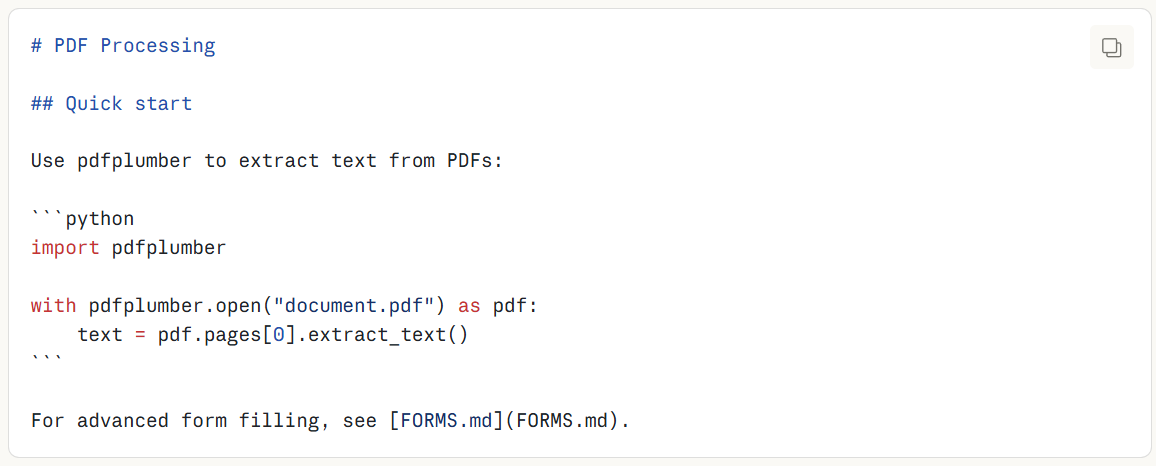
level3:Resources and code(Instructions/code/resources):按需加载。没有token量限制。
skills捆绑一些额外的材料。skill的文件目录格式如下:
pdf-skill/
├── SKILL.md (main instructions)
├── FORMS.md (form-filling guide)
├── REFERENCE.md (detailed API reference)
└── scripts/
    └── fill_form.py (utility script)
一共三个方面数据:
1、Instructions:FORMS.md和REFERENCE.md
2、Code:可执行的脚本,py文件,通过bash执行,做一些直接操作,不需要消耗上下文
3、Resources:多的参考材料,比如数据库模式,api文档,template,example。
示例
SKILL.md格式:
---
name: your-skill-name
description: Brief description of what this Skill does and when to use it
---

# Your Skill Name

## Instructions
[Clear, step-by-step guidance for Claude to follow]

## Examples
[Concrete examples of using this Skill]
name和description的示例: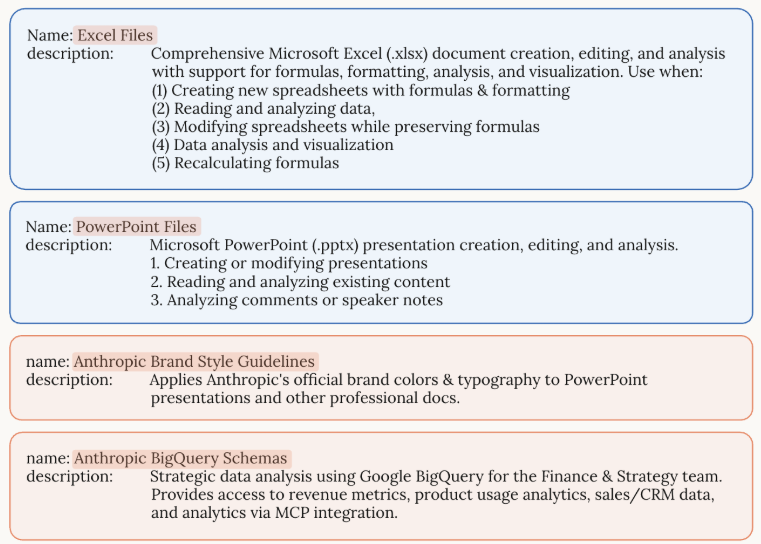
示例skill:anthropic_brand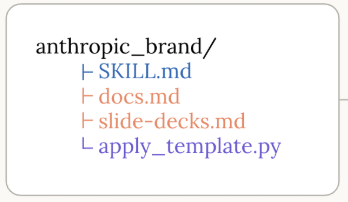
SKILL.md的内容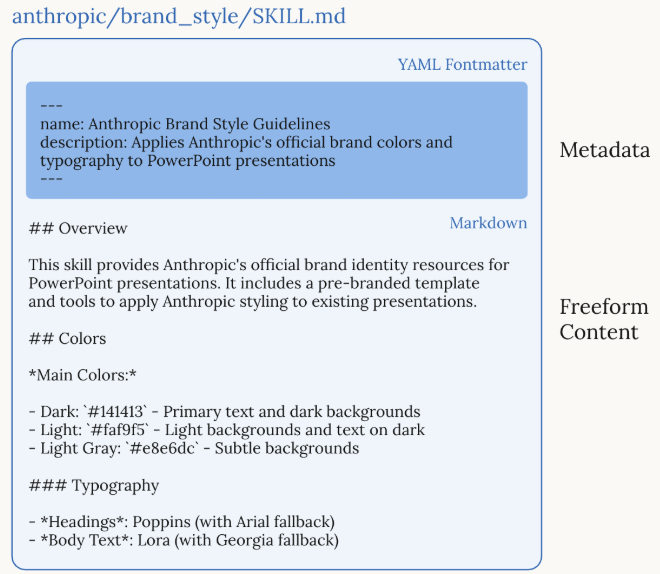

Agent 垂直技术社区,欢迎活跃、内容共建。
更多推荐

 3
3 0
0- 0


 已为社区贡献1条内容

所有评论(0)