android media rw,Android中的“/ storage/udisk/sda4 /”和“/ mnt/media_rw/udisk/sda4 /”有什么区别?...
你可以试试这个代码,我希望这方面的工作import java.io.File;import java.util.ArrayList;import java.util.Scanner;import android.os.Build;import android.os.Environment;import android.util.Log;public class StorageOptions {pr
你可以试试这个代码,我希望这方面的工作
import java.io.File;
import java.util.ArrayList;
import java.util.Scanner;
import android.os.Build;
import android.os.Environment;
import android.util.Log;
public class StorageOptions {
private static ArrayList mMounts = new ArrayList();
private static ArrayList mVold = new ArrayList();
public static String[] labels;
public static String[] paths;
public static int count = 0;
private static final String TAG = StorageOptions.class.getSimpleName();
public static void determineStorageOptions() {
readMountsFile();
readVoldFile();
compareMountsWithVold();
testAndCleanMountsList();
setProperties();
}
private static void readMountsFile() {
/*
* Scan the /proc/mounts file and look for lines like this:
* /dev/block/vold/179:1 /mnt/sdcard vfat
* rw,dirsync,nosuid,nodev,noexec,
* relatime,uid=1000,gid=1015,fmask=0602,dmask
* =0602,allow_utime=0020,codepage
* =cp437,iocharset=iso8859-1,shortname=mixed,utf8,errors=remount-ro 0 0
*
* When one is found, split it into its elements and then pull out the
* path to the that mount point and add it to the arraylist
*/
// some mount files don't list the default
// path first, so we add it here to
// ensure that it is first in our list
mMounts.add("/mnt/sdcard");
try {
Scanner scanner = new Scanner(new File("/proc/mounts"));
while (scanner.hasNext()) {
String line = scanner.nextLine();
if (line.startsWith("/dev/block/vold/")) {
String[] lineElements = line.split(" ");
String element = lineElements[1];
// don't add the default mount path
// it's already in the list.
if (!element.equals("/mnt/sdcard"))
mMounts.add(element);
}
}
} catch (Exception e) {
// Auto-generated catch block
e.printStackTrace();
}
for(String p:mMounts)
{
Log.i("storage", p);
}
}
private static void readVoldFile() {
/*
* Scan the /system/etc/vold.fstab file and look for lines like this:
* dev_mount sdcard /mnt/sdcard 1
* /devices/platform/s3c-sdhci.0/mmc_host/mmc0
*
* When one is found, split it into its elements and then pull out the
* path to the that mount point and add it to the arraylist
*/
// some devices are missing the vold file entirely
// so we add a path here to make sure the list always
// includes the path to the first sdcard, whether real
// or emulated.
mVold.add("/mnt/sdcard");
try {
Scanner scanner = new Scanner(new File("/system/etc/vold.fstab"));
while (scanner.hasNext()) {
String line = scanner.nextLine();
if (line.startsWith("dev_mount")) {
String[] lineElements = line.split(" ");
String element = lineElements[2];
if (element.contains(":"))
element = element.substring(0, element.indexOf(":"));
// don't add the default vold path
// it's already in the list.
if (!element.equals("/mnt/sdcard"))
mVold.add(element);
}
}
} catch (Exception e) {
// Auto-generated catch block
e.printStackTrace();
}
}
private static void compareMountsWithVold() {
/*
* Sometimes the two lists of mount points will be different. We only
* want those mount points that are in both list.
*
* Compare the two lists together and remove items that are not in both
* lists.
*/
for (int i = 0; i < mMounts.size(); i++) {
String mount = mMounts.get(i);
if (!mVold.contains(mount))
mMounts.remove(i--);
}
// don't need this anymore, clear the vold list to reduce memory
// use and to prepare it for the next time it's needed.
mVold.clear();
}
private static void testAndCleanMountsList() {
/*
* Now that we have a cleaned list of mount paths Test each one to make
* sure it's a valid and available path. If it is not, remove it from
* the list.
*/
for (int i = 0; i < mMounts.size(); i++) {
String mount = mMounts.get(i);
File root = new File(mount);
if (!root.exists() || !root.isDirectory() || !root.canWrite())
mMounts.remove(i--);
}
}
@SuppressWarnings("unchecked")
private static void setProperties() {
/*
* At this point all the paths in the list should be valid. Build the
* public properties.
*/
Constants.mMounts = new ArrayList();
ArrayList mLabels = new ArrayList();
int j = 0;
if (mMounts.size() > 0) {
if (Build.VERSION.SDK_INT < Build.VERSION_CODES.GINGERBREAD)
mLabels.add("Auto");
else if (Build.VERSION.SDK_INT < Build.VERSION_CODES.HONEYCOMB) {
if (Environment.isExternalStorageRemovable()) {
mLabels.add("External SD Card 1");
j = 1;
} else
mLabels.add("Internal Storage");
} else {
if (!Environment.isExternalStorageRemovable()
|| Environment.isExternalStorageEmulated())
mLabels.add("Internal Storage");
else {
mLabels.add("External SD Card 1");
j = 1;
}
}
if (mMounts.size() > 1) {
for (int i = 1; i < mMounts.size(); i++) {
mLabels.add("External SD Card " + (i + j));
}
}
}
labels = new String[mLabels.size()];
mLabels.toArray(labels);
paths = new String[mMounts.size()];
mMounts.toArray(paths);
Constants.mMounts = (ArrayList) mMounts.clone();
Constants.mLabels = (ArrayList) mLabels.clone();
count = Math.min(labels.length, paths.length);
// don't need this anymore, clear the mounts list to reduce memory
// use and to prepare it for the next time it's needed.
mMounts.clear();
}
}
这个代码可以帮助您找到所有SD卡和外部存储路径
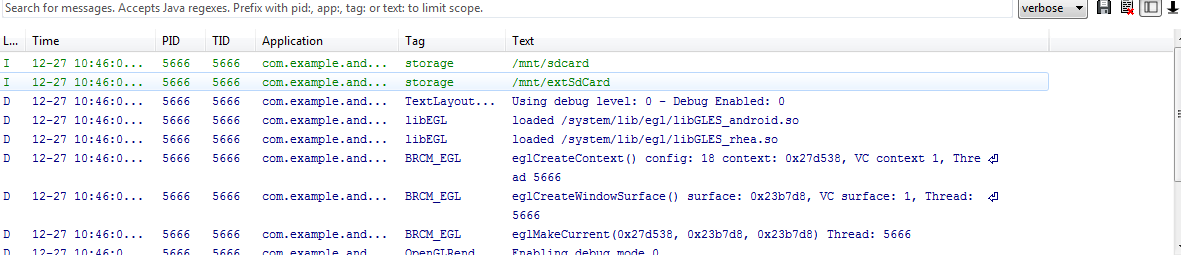
我得到了我的三星手机

Agent 垂直技术社区,欢迎活跃、内容共建。
更多推荐

 0
0 0
0- 0


 已为社区贡献1条内容

所有评论(0)