基于FastAPI实现本地大模型API封装调用(message篇)
【代码】基于FastAPI实现本地大模型API封装调用(message篇)
·
- 注意传入的参数形式为list
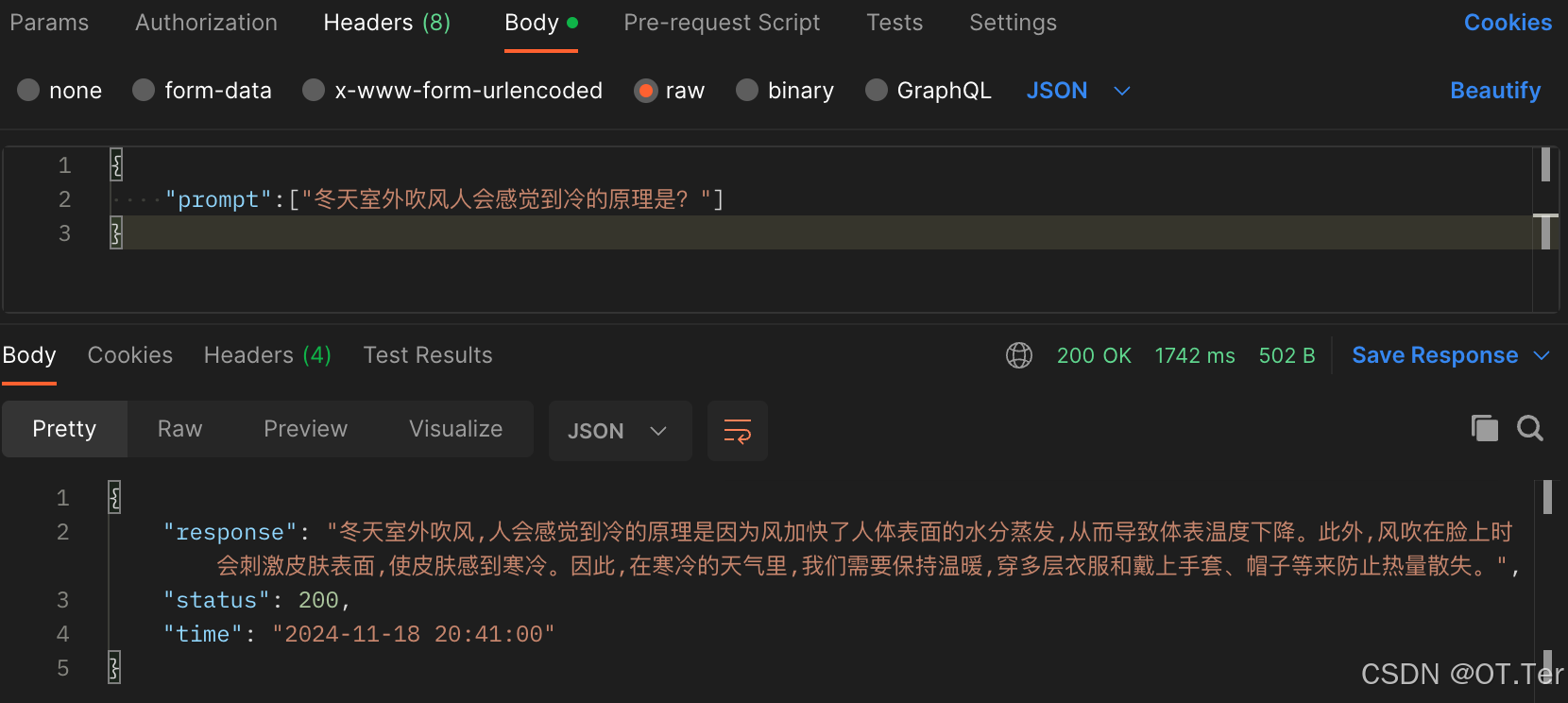
- 代码实现
- fastapi_demo.py(运行开启服务)
- post.py(服务测试)
# fastapi_demo.py(运行开启服务)
from fastapi import FastAPI, Request, HTTPException
from transformers import AutoTokenizer, AutoModelForCausalLM, GenerationConfig
import uvicorn
import json
import datetime
import torch
import logging

# 在文件开头添加
print(f"CUDA 是否可用: {torch.cuda.is_available()}")
print(f"当前 CUDA 版本: {torch.version.cuda}")
print(f"当前可用 CUDA 设备数量: {torch.cuda.device_count()}")

# 设置设备参数
DEVICE = "cuda"  # 使用CUDA
DEVICE_ID = "0"  # CUDA设备ID,如果未设置则为空
CUDA_DEVICE = f"{DEVICE}:{DEVICE_ID}" if DEVICE_ID else DEVICE  # 组合CUDA设备信息

# 清理GPU内存函数
def torch_gc():
    if torch.cuda.is_available():  # 检查是否可用CUDA
        with torch.cuda.device(CUDA_DEVICE):  # 指定CUDA设备
            torch.cuda.empty_cache()  # 清空CUDA缓存
            torch.cuda.ipc_collect()  # 收集CUDA内存碎片

# 构建 chat 模版
def bulid_input(prompt, history=[], system_message=None):
    system_format = 'system\n\n{content}\n'
    user_format = 'user\n\n{content}\n'
    assistant_format = 'assistant\n\n{content}\n'

    prompt_str = ''

    # 添加system消息
    if system_message:
        prompt_str += system_format.format(content=system_message)

    # 拼接历史对话
    for item in history:
        if item['role'] == 'user':
            prompt_str += user_format.format(content=item['content'])
        else:
            prompt_str += assistant_format.format(content=item['content'])

    # 添加当前用户输入
    prompt_str += user_format.format(content=prompt)

    return prompt_str

# 创建FastAPI应用
app = FastAPI()

# 添加GET请求处理
@app.get("/")
async def read_root():
    return {"message": "Welcome to the API. Please use POST method to interact with the model."}

@app.get('/favicon.ico')
async def favicon():
    return {'status': 'ok'}

# 处理POST请求的端点
@app.post("/")
async def create_item(request: Request):
    try:
        json_post_raw = await request.json()
        json_post = json.dumps(json_post_raw)
        json_post_list = json.loads(json_post)

        # 支持messages格式
        messages = json_post_list.get('messages')
        if messages:
            # 将messages列表转换为prompt列表
            prompt = [msg['content'] for msg in messages if msg.get('content')]
        else:
            # 保持原有的prompt支持
            prompt = json_post_list.get('prompt')

        if not prompt:
            raise HTTPException(status_code=400, detail="提示词不能为空")

        # 如果prompt是列表,就用换行符连接
        if isinstance(prompt, list):
            prompt = '\n'.join(prompt)

        history = json_post_list.get('history', [])
        system_message = json_post_list.get('system_message')

        logging.info(f"收到请求: prompt={prompt}, history={history}, system_message={system_message}")

        input_str = bulid_input(prompt=prompt, history=history, system_message=system_message)
        try:
            input_ids = process_input(input_str).to(CUDA_DEVICE)
        except Exception as e:
            logging.error(f"Tokenizer 错误: {str(e)}")
            raise HTTPException(status_code=500, detail=f"Tokenizer 处理失败: {str(e)}")

        try:
            generated_ids = model.generate(
                input_ids=input_ids, max_new_tokens=1024, do_sample=True,
                top_p=0.5, temperature=0.95, repetition_penalty=1.1
            )
        except Exception as e:
            logging.error(f"模型生成错误: {str(e)}")
            raise HTTPException(status_code=500, detail=f"模型生成失败: {str(e)}")

        outputs = generated_ids.tolist()[0][len(input_ids[0]):]
        response = tokenizer.decode(outputs)
        response = response.strip().replace('assistant\n\n', '').strip()  # 解析 chat 模版

        now = datetime.datetime.now()  # 获取当前时间
        time = now.strftime("%Y-%m-%d %H:%M:%S")  # 格式化时间为字符串
        # 构建响应JSON
        answer = {
            "response": response,
            "status": 200,
            "time": time
        }
        # 构建日志信息
        log = "[" + time + "] " + '", prompt:"' + prompt + '", response:"' + repr(response) + '"'
        print(log)  # 打印日志
        torch_gc()  # 执行GPU内存清理
        return answer  # 返回响应

    except json.JSONDecodeError:
        raise HTTPException(status_code=400, detail="无效的 JSON 格式")
    except Exception as e:
        logging.error(f"处理请求时发生错误: {str(e)}")
        raise HTTPException(status_code=500, detail=str(e))

# 主函数入口
if __name__ == '__main__':
    # 首先检查可用的GPU数量
    gpu_count = torch.cuda.device_count()
    if int(DEVICE_ID) >= gpu_count:
        raise ValueError(f"指定的DEVICE_ID ({DEVICE_ID}) 无效。系统只有 {gpu_count} 个GPU设备(0-{gpu_count-1})")

    # 设置当前CUDA设备
    torch.cuda.set_device(int(DEVICE_ID))

    model_name_or_path = '/data/user23262833/MemoryStrategy/ChatGLM-Finetuning/chatglm3-6b'

    # 修改 tokenizer 初始化
    tokenizer = AutoTokenizer.from_pretrained(
        model_name_or_path,
        use_fast=False,
        trust_remote_code=True,
        padding_side='left'  # 直接在初始化时设置
    )

    # 更简单的 process_input 实现
    def process_input(text):
        inputs = tokenizer.encode(text, return_tensors='pt')
        return inputs if torch.is_tensor(inputs) else torch.tensor([inputs])

    model = AutoModelForCausalLM.from_pretrained(
        model_name_or_path,
        device_map={"": int(DEVICE_ID)},  # 明确指定设备映射
        torch_dtype=torch.float16
    )

    # 启动FastAPI应用
    # 用6006端口可以将autodl的端口映射到本地,从而在本地使用api
    uvicorn.run(app, host='10.68.84.28', port=6006, workers=1)  # 在指定端口和主机上启动应用
# post.py
import requests
import json

def get_completion(prompt):
    try:
        headers = {
            'Content-Type': 'application/json',
            'Accept': 'application/json'
        }

        # 修改数据格式
        if isinstance(prompt, list):
            # 确保每个提示都是字典格式
            messages = [{"role": "user", "content": msg} for msg in prompt]
            data = {"messages": messages}
        else:
            data = {"messages": [{"role": "user", "content": prompt}]}

        print("发送请求数据:", json.dumps(data, ensure_ascii=False))  # 使用ensure_ascii=False显示中文

        response = requests.post(
            url='http://10.68.84.28:6006',
            headers=headers,
            json=data,
            timeout=30
        )

        print(f"状态码: {response.status_code}")
        print(f"响应头: {response.headers}")
        print(f"响应内容: {response.text}")

        if response.status_code == 500:
            error_detail = response.json().get('detail', '未知错误')
            print(f"服务器错误: {error_detail}")
            return None

        response.raise_for_status()

        response_data = response.json()
        if 'response' in response_data:
            return response_data['response']
        else:
            print(f"警告:响应中没有'response'键,完整响应:{response_data}")
            return response_data

    except requests.exceptions.RequestException as e:
        print(f"请求错误: {str(e)}")
        return None
    except json.JSONDecodeError as e:
        print(f"JSON解析错误: {str(e)}")
        return None
    except Exception as e:
        print(f"未预期的错误: {str(e)}")
        return None

# 测试代码
test_prompt = ["请帮我分析下面这句话中的命名实体:张三在北京大学学习。"]  # 修改测试用例
print(f"测试提示: {test_prompt}")
response = get_completion(test_prompt)
if response is not None:
    print("成功获得响应:", response)
else:
    print("请求失败")
- 测试结果

- 参考博文:https://blog.csdn.net/qq_34717531/article/details/142092636?spm=1001.2101.3001.6661.1&utm_medium=distribute.pc_relevant_t0.none-task-blog-2%7Edefault%7EOPENSEARCH%7EPaidSort-1-142092636-blog-139909949.235%5Ev43%5Epc_blog_bottom_relevance_base5&depth_1-utm_source=distribute.pc_relevant_t0.none-task-blog-2%7Edefault%7EOPENSEARCH%7EPaidSort-1-142092636-blog-139909949.235%5Ev43%5Epc_blog_bottom_relevance_base5&utm_relevant_index=1

Agent 垂直技术社区,欢迎活跃、内容共建。
更多推荐

 5
5 0
0- 0


 已为社区贡献3条内容

所有评论(0)