JAVA对接AI大模型
在application.yml配置自己专属的API-KEY。
·
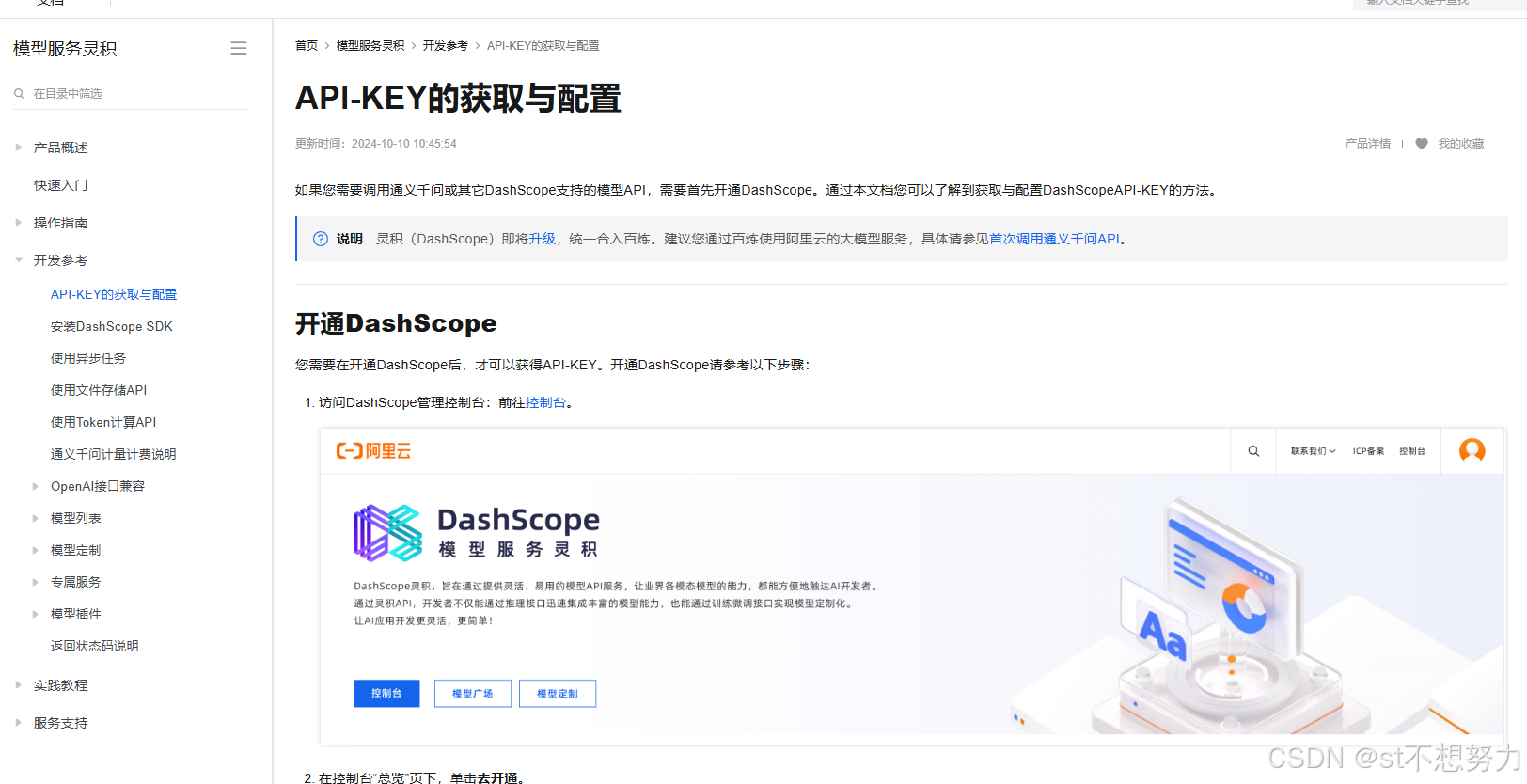
1.API-KEY的获取与配置
2.引入Java SDK 依赖
<!-- https://mvnrepository.com/artifact/com.alibaba/dashscope-sdk-java -->
<dependency>
    <groupId>com.alibaba</groupId>
    <artifactId>dashscope-sdk-java</artifactId>
    <version>the-latest-version</version>
</dependency>
3.配置API-KEY(配置文件/环境变量)
在application.yml配置自己专属的API-KEY
4.代码示例
import java.util.Arrays;
import com.alibaba.dashscope.aigc.generation.Generation;
import com.alibaba.dashscope.aigc.generation.GenerationParam;
import com.alibaba.dashscope.aigc.generation.GenerationResult;
import com.alibaba.dashscope.common.Message;
import com.alibaba.dashscope.common.Role;
import com.alibaba.dashscope.exception.ApiException;
import com.alibaba.dashscope.exception.InputRequiredException;
import com.alibaba.dashscope.exception.NoApiKeyException;
import com.alibaba.dashscope.utils.JsonUtils;

public class Main {
    public static GenerationResult callWithMessage() throws ApiException, NoApiKeyException, InputRequiredException {
        Generation gen = new Generation();
        Message systemMsg = Message.builder()
                .role(Role.SYSTEM.getValue())
                .content("You are a helpful assistant.")
                .build();
        Message userMsg = Message.builder()
                .role(Role.USER.getValue())
                .content("你是谁?")
                .build();
        GenerationParam param = GenerationParam.builder()
                .model("qwen-turbo")
                .messages(Arrays.asList(systemMsg, userMsg))
                .resultFormat(GenerationParam.ResultFormat.MESSAGE)
                .build();
        return gen.call(param);
    }
    public static void main(String[] args) {
        try {
            GenerationResult result = callWithMessage();
            System.out.println(JsonUtils.toJson(result));
        } catch (ApiException | NoApiKeyException | InputRequiredException e) {
            // 使用日志框架记录异常信息
            // Logger.error("An error occurred while calling the generation service", e);
            System.err.println("An error occurred while calling the generation service: " + e.getMessage());
        }
        System.exit(0);
    }
}

Agent 垂直技术社区,欢迎活跃、内容共建。
更多推荐
 1
1 0
0- 0


 已为社区贡献1条内容

所有评论(0)