javascript 编程、操作、清洗 mongodb数据
1. 书写javascript脚本连接数据库脚本,connect.js,内容:function getConnection() {username = "root";password = "密码";this.getDB = function (dbname) {conn = new Mongo("localhost:27017");db = conn.getDB(dbname);db.auth(u
·
1. 书写javascript脚本
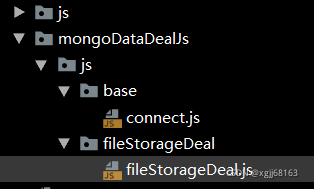
连接数据库脚本,connect.js,内容:
function getConnection() {
    username = "root";
    password = "密码";
    this.getDB = function (dbname) {
        conn = new Mongo("localhost:27017");
        db = conn.getDB(dbname);
        db.auth(username,password);
        return db;
    }
}
清洗数据脚本,fileStorageDeal.js,内容:
load("/mongoDataDealJs/js/base/connect.js");
conn = new getConnection();
db = conn.getDB("admin");
db = conn.getDB("数据库名称");
var cursor = db.getCollection('file_storage').find({});
while (cursor.hasNext()) {
    r = cursor.next();
    printjson(r); // 打印
    db.getCollection('file_record').insert({"username" : r.username,
        "status" : r.status,
        "createdDate" : r.createdDate,
        "lastModifiedDate" : r.lastModifiedDate,
        "_class" : r._class})
}
2. 进入mongodb安装目录bin;
3. 执行命令:mongo /mongoDataDealJs/js/fileStorageDeal/fileStorageDeal.js
实际开发案例
## 使用说明

### 从数据库中导出应用表的csv文件t_app_config.csv
### 使用命令导入csv文件
mongoimport --authenticationDatabase=admin -u useranme -p password -d 数据库名 --type csv --headerline --file /home/t_app_config.csv
### 拷贝abaseToMongo.js到mongo服务器/home目录下
+ 修改数据库连接用户名和密码
+ 进入mongo安装目录bin
+ 执行命令:mongo /home/abaseToMongo.js
function getConnection() {
    username = "root";
    password = "password";
    this.getDB = function (dbname) {
        conn = new Mongo("localhost:27017");
        db = conn.getDB(dbname);
        db.auth(username, password);
        return db;
    }
}

conn = new getConnection();
db = conn.getDB("admin");
db = conn.getDB("ecode_menhu");
var statusEnable = "ENABLED";
var statusDisabled = "DISABLED";
// 更新或新增应用
var cursor = db.getCollection('t_app_config').find({});
print("==========mdm_app count:" + db.getCollection('mdm_app').find({}).count())
print("==========mdm_app_entry count:" + db.getCollection('mdm_app_entry').find({}).count())
print("==========mdm_app_pc count:" + db.getCollection('mdm_app_pc').find({}).count())
print("==========mdm_thirdparty_app_setting count:" + db.getCollection('mdm_thirdparty_app_setting').find({}).count())
while (cursor.hasNext()) {
    var r = cursor.next();
    // 是否存在,存在修改,不存在新增

    var terminal = r.n_terminal;
    var appStatus = statusEnable;
    if (r.n_valid != 1) {
        appStatus = statusDisabled;
    }
    if (terminal.indexOf("2") != -1 || terminal.indexOf("3") != -1) {
        // 应用表mdm_app
        var oldAppCount = db.getCollection('mdm_app').find({_id: r.c_id}).count();
        if (oldAppCount > 0) {
            // 修改应用
            db.getCollection('mdm_app').update({
                    _id: r.c_id
                }, {
                    $set: {
                        _id: r.c_id,
                        name: r.c_name,
                        belong: "online_h5",
                        description: r.c_summary,
                        icon96: r.c_icon,
                        sortNo: r.n_order,
                        status: appStatus,
                        createdDate: new Date(r.dt_cjsj),
                        lastModifiedDate: new Date(r.dt_zhgxsj),
                        _class: "cn.fingersoft.module.core.bean.doc.App"
                    }
                },
                {
                    multi: true
                });
        } else {
            // 新增应用
            db.getCollection('mdm_app').insert({
                _id: r.c_id,
                name: r.c_name,
                belong: "online_h5",
                description: r.c_summary,
                icon96: r.c_icon,
                sortNo: r.n_order,
                status: appStatus,
                createdDate: new Date(r.dt_cjsj),
                lastModifiedDate: new Date(r.dt_zhgxsj),
                _class: "cn.fingersoft.module.core.bean.doc.App"
            });
        }

        // 应用入口表mdm_app_entry
        if (r.n_valid == 1) {
            // 查询应用
            var entryAppCursor = db.getCollection('mdm_app').find({_id: r.c_id});
            var entryApp = null;
            while (entryAppCursor.hasNext()) {
                entryApp = entryAppCursor.next();
            }
            if (null != entryApp) {
                var oldAppEntryCount = db.getCollection('mdm_app_entry').find({_id: r.c_id}).count();
                if (oldAppEntryCount > 0) {
                    // 修改应用入口
                    db.getCollection('mdm_app_entry').update({
                            _id: r.c_id
                        }, {
                            $set: {
                                _id: r.c_id,
                                app: {
                                    "$ref" : "mdm_app",
                                    "$id" : entryApp._id
                                },
                                name: r.c_name,
                                remark: r.c_summary,
                                ico: r.c_icon,
                                href: r.c_mobile_url,
                                appId: r.c_appkey,
                                appSecret: r.c_secret,
                                createdDate: new Date(r.dt_cjsj),
                                lastModifiedDate: new Date(r.dt_zhgxsj),
                                _class: "cn.fingersoft.module.core.bean.doc.AppEntry"
                            }
                        },
                        {
                            multi: true
                        });
                } else {
                    // 新增应用入口
                    db.getCollection('mdm_app_entry').insert({
                        _id: r.c_id,
                        app: {
                            "$ref" : "mdm_app",
                            "$id" : entryApp._id
                        },
                        name: r.c_name,
                        remark: r.c_summary,
                        ico: r.c_icon,
                        href: r.c_mobile_url,
                        appId: r.c_appkey,
                        appSecret: r.c_secret,
                        createdDate: new Date(r.dt_cjsj),
                        lastModifiedDate: new Date(r.dt_zhgxsj),
                        _class: "cn.fingersoft.module.core.bean.doc.AppEntry"
                    });
                }
            }
        }
    }
    if (terminal.indexOf("1") != -1) {
        // pc应用表mdm_app_pc
        var oldAppEntryCount = db.getCollection('mdm_app_pc').find({_id: r.c_id}).count();
        var pcStatus = statusEnable;
        if (r.n_valid != 1) {
            pcStatus = statusDisabled;
        }
        if (oldAppEntryCount > 0) {
            // 修改pc应用
            db.getCollection('mdm_app_pc').update({
                    _id: r.c_id
                }, {
                    $set: {
                        _id: r.c_id,
                        name: r.c_name,
                        remark: r.c_summary,
                        icon: r.c_icon,
                        href: r.c_pc_url,
                        appId: r.c_appkey,
                        appSecret: r.c_secret,
                        status: pcStatus,
                        createdDate: new Date(r.dt_cjsj),
                        lastModifiedDate: new Date(r.dt_zhgxsj),
                        _class: "cn.fingersoft.module.core.bean.doc.AppPC"
                    }
                },
                {
                    multi: true
                });
        } else {
            // 新增pc应用
            db.getCollection('mdm_app_pc').insert({
                _id: r.c_id,
                name: r.c_name,
                remark: r.c_summary,
                icon: r.c_icon,
                href: r.c_pc_url,
                appId: r.c_appkey,
                appSecret: r.c_secret,
                status: pcStatus,
                createdDate: new Date(r.dt_cjsj),
                lastModifiedDate: new Date(r.dt_zhgxsj),
                _class: "cn.fingersoft.module.core.bean.doc.AppPC"
            });
        }
    }
    // 第三方应用设置表mdm_thirdparty_app_setting
    var oldThirdSettingCount = db.getCollection('mdm_thirdparty_app_setting').find({_id: r.c_id}).count();
    if (r.n_valid == 1) {
        if (oldThirdSettingCount > 0) {
            // 修改三方应用配置
            db.getCollection('mdm_thirdparty_app_setting').update({
                    _id: r.c_id
                }, {
                    $set: {
                        _id: r.c_id,
                        name: r.c_name,
                        description: r.c_summary,
                        appid: r.c_appkey,
                        secret: r.c_secret,
                        expireTime: 0,
                        createdDate: new Date(r.dt_cjsj),
                        lastModifiedDate: new Date(r.dt_zhgxsj),
                        _class: "cn.fingersoft.module.core.bean.doc.ThirdPartyAppSetting"
                    }
                },
                {
                    multi: true
                });
        } else {
            // 新增三方应用配置
            db.getCollection('mdm_thirdparty_app_setting').insert({
                _id: r.c_id,
                name: r.c_name,
                description: r.c_summary,
                appid: r.c_appkey,
                secret: r.c_secret,
                expireTime: 0,
                createdDate: new Date(r.dt_cjsj),
                lastModifiedDate: new Date(r.dt_zhgxsj),
                _class: "cn.fingersoft.module.core.bean.doc.ThirdPartyAppSetting"
            });
        }
    }

}
print("==========mdm_app count:" + db.getCollection('mdm_app').find({}).count())
print("==========mdm_app_entry count:" + db.getCollection('mdm_app_entry').find({}).count())
print("==========mdm_app_pc count:" + db.getCollection('mdm_app_pc').find({}).count())
print("==========mdm_thirdparty_app_setting count:" + db.getCollection('mdm_thirdparty_app_setting').find({}).count())
实际开发案例二:
var cursor = db.getCollection('core_app_path').find({},{name:1,href:1})
while (cursor.hasNext()) {
    r = cursor.next();
    printjson(r); // 打印
    db.getCollection('core_app_path_hj').insert({"route" : "<route name=\""+ r.name+"\" address=\""+r.href+"\">"})
}

Agent 垂直技术社区,欢迎活跃、内容共建。
更多推荐

 0
0 0
0- 0


 已为社区贡献1条内容

所有评论(0)