本地SpringBoot集成ollama调用本地DeepSeek AI大模型
作为国产大模型的优秀代表,DeepSeek凭借其卓越的中文语义理解能力和开发者友好的API生态,正在成为构建本土化AI应用的首选平台。上一篇我们更介绍如何在本地部署DeepSeek,今天我们来分享一下如何使用SpringBoot集成Ollama实现DeepSeek AI 模型简单的对话。请介绍你自己,DeepSeek AI大模型就可以跟你对话了,这样一个简单AI大模型对话就完成了,这里没有结合前端
·
在生成式AI技术蓬勃发展的今天,大语言模型已成为企业智能化转型和个人效率提升的核心驱动力。作为国产大模型的优秀代表,DeepSeek凭借其卓越的中文语义理解能力和开发者友好的API生态,正在成为构建本土化AI应用的首选平台。
上一篇我们更介绍如何在本地部署DeepSeek,今天我们来分享一下如何使用SpringBoot集成Ollama实现DeepSeek AI 模型简单的对话
环境准备
SpringBoot 3.X
JDK 17+
Maven 3.6+
pom.xml依赖
<?xml version="1.0" encoding="UTF-8"?>
<project xmlns="http://maven.apache.org/POM/4.0.0" xmlns:xsi="http://www.w3.org/2001/XMLSchema-instance"
    xsi:schemaLocation="http://maven.apache.org/POM/4.0.0 https://maven.apache.org/xsd/maven-4.0.0.xsd">
    <modelVersion>4.0.0</modelVersion>
    <groupId>com.hmt</groupId>
    <artifactId>DeepSeekDemo</artifactId>
    <version>0.0.1-SNAPSHOT</version>
    <name>DeepSeekDemo</name>
    <description>Demo project for Spring Boot</description>
    <properties>
        <java.version>17</java.version>
        <project.build.sourceEncoding>UTF-8</project.build.sourceEncoding>
        <project.reporting.outputEncoding>UTF-8</project.reporting.outputEncoding>
        <spring-boot.version>3.2.9</spring-boot.version>
    </properties>
    <dependencies>
        <dependency>
            <groupId>org.springframework.boot</groupId>
            <artifactId>spring-boot-starter-web</artifactId>
        </dependency>

        <dependency>
            <groupId>org.springframework.boot</groupId>
            <artifactId>spring-boot-starter-test</artifactId>
            <scope>test</scope>
        </dependency>

        <dependency>
            <groupId>org.springframework.ai</groupId>
            <artifactId>spring-ai-ollama-spring-boot-starter</artifactId>
        </dependency>
    </dependencies>
    <dependencyManagement>
        <dependencies>
            <dependency>
                <groupId>org.springframework.boot</groupId>
                <artifactId>spring-boot-dependencies</artifactId>
                <version>${spring-boot.version}</version>
                <type>pom</type>
                <scope>import</scope>
            </dependency>
        </dependencies>
    </dependencyManagement>

    <build>
        <plugins>
            <plugin>
                <groupId>org.apache.maven.plugins</groupId>
                <artifactId>maven-compiler-plugin</artifactId>
                <version>3.8.1</version>
                <configuration>
                    <source>17</source>
                    <target>17</target>
                    <encoding>UTF-8</encoding>
                </configuration>
            </plugin>
            <plugin>
                <groupId>org.springframework.boot</groupId>
                <artifactId>spring-boot-maven-plugin</artifactId>
                <version>${spring-boot.version}</version>
                <configuration>
                    <mainClass>com.hmt.deepseek.DeepSeekDemoApplication</mainClass>
                    <skip>true</skip>
                </configuration>
                <executions>
                    <execution>
                        <id>repackage</id>
                        <goals>
                            <goal>repackage</goal>
                        </goals>
                    </execution>
                </executions>
            </plugin>
        </plugins>
    </build>

</project>
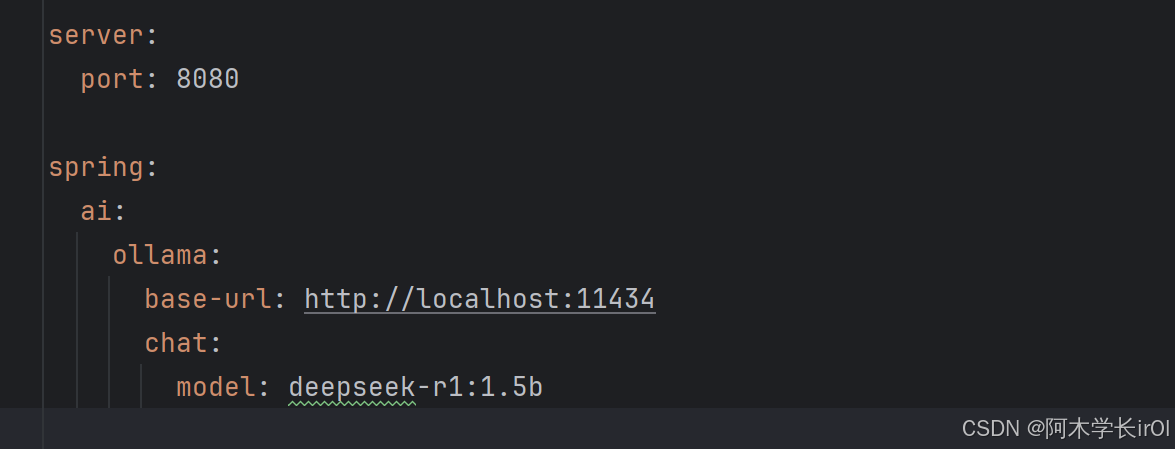
yml 配置文件
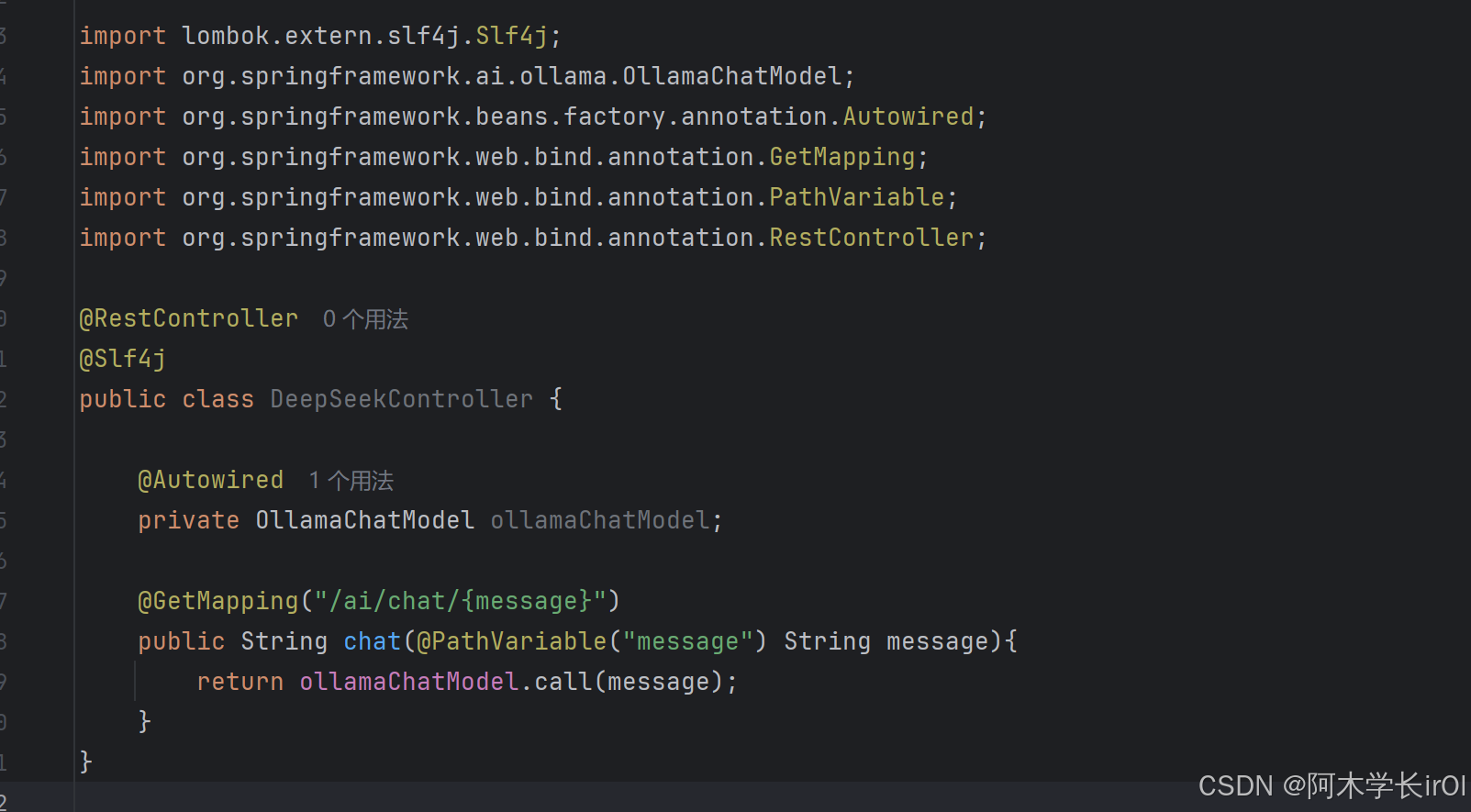
后端代码实现
启动SpringBoot项目,打开浏览器,在浏览器输入http://localhost:8080/ai/chat/
请介绍你自己,DeepSeek AI大模型就可以跟你对话了,这样一个简单AI大模型对话就完成了,这里没有结合前端,你可以加前端页面就真的能实现AI模块对话了。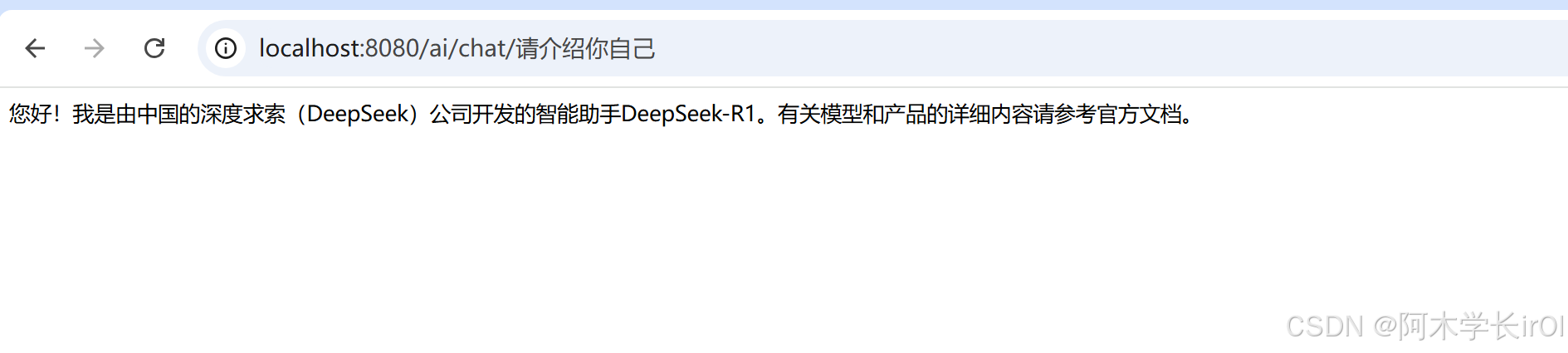

Agent 垂直技术社区,欢迎活跃、内容共建。
更多推荐

 24
24 0
0- 0


 已为社区贡献1条内容

所有评论(0)