Android fragment+MVVM
Android Fragment+MVVMAndroid fragment+MVVMFragmentFragment生命周期Fragment 管理器访问 FragmentManagerFragment 动画设置动画设置过渡Fragment 数据共享模式使用 ViewModel 共享数据在 Fragment 之间共享数据在父 Fragment 与子 Fragment 之间共享数据使用 Fragmen
Android Fragment+MVVM
Android fragment+MVVM
Fragment
从google官网信息摘取
Fragment 表示应用界面中可重复使用的一部分。Fragment 定义和管理自己的布局,具有自己的生命周期,并且可以处理自己的输入事件。Fragment 不能独立存在,而是必须由 Activity 或另一个 Fragment 托管。Fragment 的视图层次结构会成为宿主的视图层次结构的一部分,或附加到宿主的视图层次结构。
模块化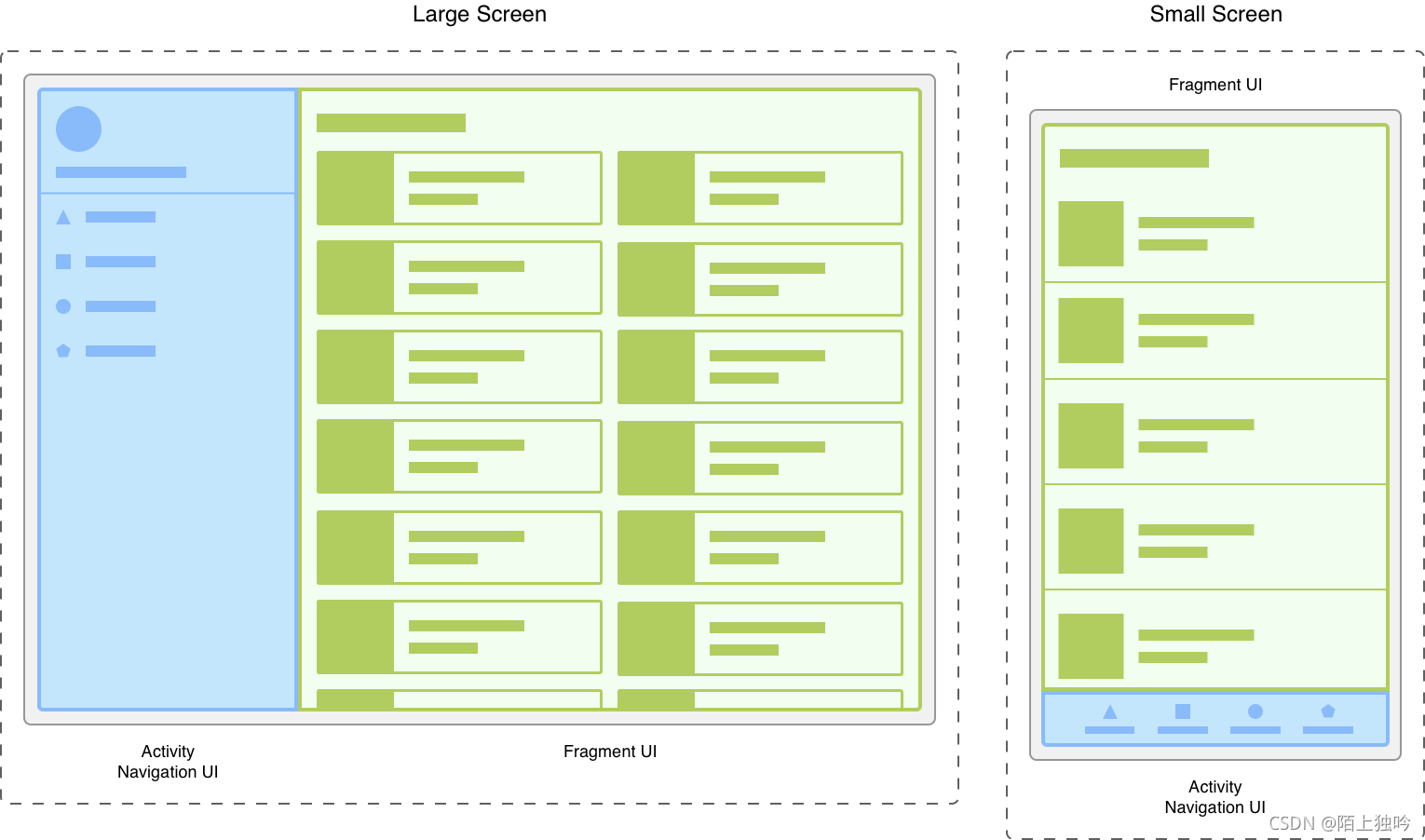
Fragment 允许您将界面划分为离散的区块,从而将模块化和可重用性引入 Activity 的界面。Activity 是围绕应用的界面放置全局元素(如抽屉式导航栏)的理想位置。相反,Fragment 更适合定义和管理单个屏幕或部分屏幕的界面。
假设有一个响应各种屏幕尺寸的应用。在较大的屏幕上,该应用应显示一个静态抽屉式导航栏和一个采用网格布局的列表。在较小的屏幕上,该应用应显示一个底部导航栏和一个采用线性布局的列表。在 Activity 中管理所有这些变化因素可能会很麻烦。将导航元素与内容分离可使此过程更易于管理。然后,Activity 负责显示正确的导航界面,而 Fragment 采用适当的布局显示列表。
第一张图同一屏幕的采用不同屏幕尺寸的两个版本。在左侧,大屏幕包含一个由 Activity 控制的抽屉式导航栏和一个由 Fragment 控制的网格列表。在右侧,小屏幕包含一个由 Activity 控制的底部导航栏和一个由 Fragment 控制的线性列表。
将界面划分为 Fragment 可让您更轻松地在运行时修改 Activity 的外观。当 Activity 处于 STARTED 生命周期状态或更高的状态时,可以添加、替换或移除 Fragment。您可以将这些更改的记录保留在由 Activity 管理的返回堆栈中,从而允许撤消这些更改。
您可以在同一 Activity 或多个 Activity 中使用同一 Fragment 类的多个实例,甚至可以将其用作另一个 Fragment 的子级。考虑到这一点,您应只为 Fragment 提供管理它自己的界面所需的逻辑。您应避免让一个 Fragment 依赖于另一个 Fragment 或从一个 Fragment 操控另一个 Fragment。
Create a fragment class
    class ExampleFragment extends Fragment {

        public ExampleFragment() {
            super(R.layout.example_fragment);
        }

    }
Add a fragment to an activity
    public class ExampleActivity extends AppCompatActivity {

        public ExampleActivity() {
            super(R.layout.example_activity);
        }
        @Override
        protected void onCreate(Bundle savedInstanceState) {
            super.onCreate(savedInstanceState);
            if (savedInstanceState == null) {
                getSupportFragmentManager().beginTransaction()
                    .setReorderingAllowed(true)
                    .add(R.id.fragment_container_view, ExampleFragment.class, null)
                    .commit();
            }
        }

    }
携带bundle数据
    public class ExampleActivity extends AppCompatActivity {

        public ExampleActivity() {
            super(R.layout.example_activity);
        }
        @Override
        protected void onCreate(Bundle savedInstanceState) {
            super.onCreate(savedInstanceState);
            if (savedInstanceState == null) {
                Bundle bundle = new Bundle();
                bundle.putInt("some_int", 0);

                getSupportFragmentManager().beginTransaction()
                    .setReorderingAllowed(true)
                    .add(R.id.fragment_container_view, ExampleFragment.class, bundle)
                    .commit();
            }
        }

    }
实例的fragment中获取数据
    class ExampleFragment extends Fragment {
        public ExampleFragment() {
            super(R.layout.example_fragment);
        }

        @Override
        public void onViewCreated(@NonNull View view, Bundle savedInstanceState) {
            int someInt = requireArguments().getInt("some_int");
            ...
        }
    }
Fragment生命周期
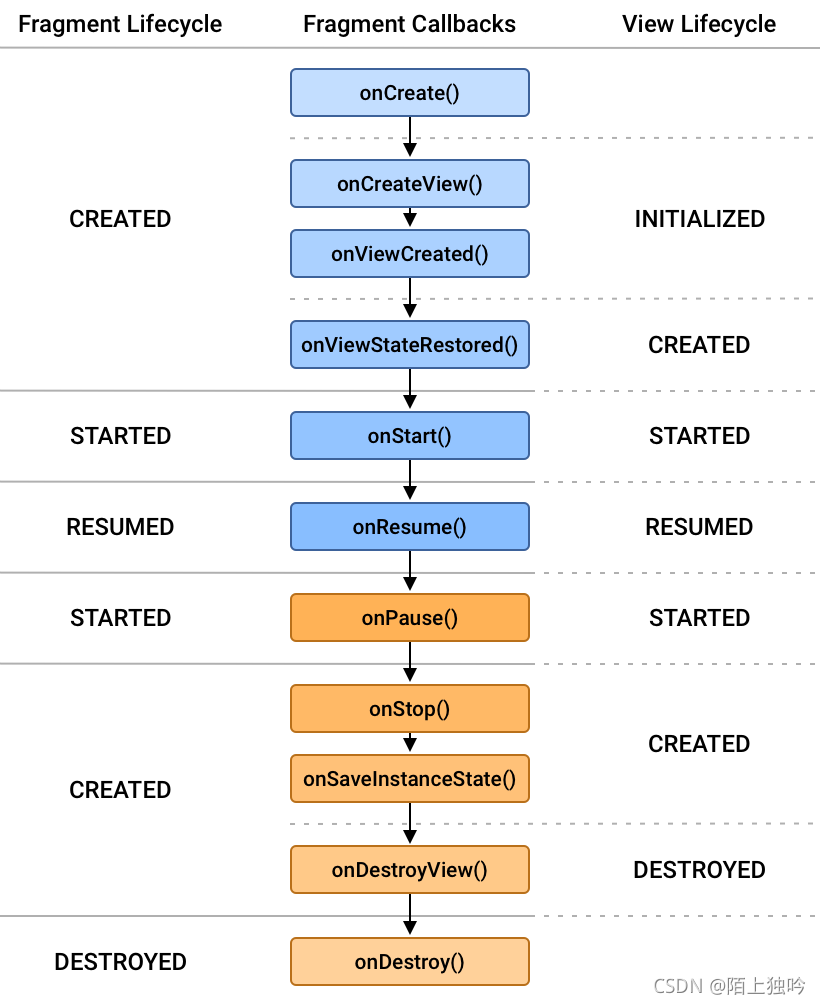
每个Fragment实例都有自己的生命周期。当用户导航并与您的应用程序交互时,您的片段会在其生命周期中的各种状态之间转换,因为它们被添加、删除以及进入或退出屏幕。
为了管理生命周期,Fragment实现了 LifecycleOwner,暴露了一个Lifecycle你可以通过getLifecycle() 方法访问的对象 。
有哪些生命周期可以之后看 Lifecycle.State
具体参考:
官网链接
Fragment 管理器
FragmentManager 类负责对应用的 Fragment 执行一些操作,如添加、移除或替换它们,以及将它们添加到返回堆栈。
如果您使用的是 Jetpack Navigation 库,则可能永远不会直接与 FragmentManager 交互,因为该库会代表您使用 FragmentManager。也就是说,任何使用 Fragment 的应用都在某种程度上使用 FragmentManager,因此了解它是什么以及它如何工作非常重要。
本主题介绍如何访问 FragmentManager、FragmentManager 与 Activity 和 Fragment 相关的角色、如何使用 FragmentManager 管理返回堆栈,以及如何为 Fragment 提供数据和依赖项。
访问 FragmentManager
在 Activity 中访问
每个 FragmentActivity 及其子类(如 AppCompatActivity)都可以通过 getSupportFragmentManager() 方法访问 FragmentManager。
在 Fragment 中访问
Fragment 也能够托管一个或多个子 Fragment。在 Fragment 内,您可以通过 getChildFragmentManager() 获取对管理 Fragment 子级的 FragmentManager 的引用。如果您需要访问其宿主 FragmentManager,可以使用 getParentFragmentManager()。
这部分具体内存参考官方链接
使用 FragmentManager
FragmentManager 管理 Fragment 返回堆栈。在运行时,FragmentManager 可以执行添加或移除 Fragment 等返回堆栈操作来响应用户互动。每一组更改作为一个单元(称为 FragmentTransaction)一起提交。如需更深入地了解 Fragment 事务,请参阅 Fragment 事务指南。
当用户按设备上的“返回”按钮时,或者当您调用 FragmentManager.popBackStack() 时,最上面的 Fragment 事务会从堆栈中弹出。换句话说,事务是反转的。如果堆栈上没有更多 Fragment 事务,并且您没有使用子 Fragment,则返回事件会向上传递到 Activity。如果您使用子 Fragment,请参阅有关子 Fragment 和同级 Fragment 的特殊注意事项。
当您对事务调用 addToBackStack() 时,请注意,事务可以包括任意数量的操作,如添加多个 Fragment、替换多个容器中的 Fragment,等等。弹出返回堆栈时,所有这些操作会作为一项原子化操作反转。如果您在调用 popBackStack() 之前提交了其他事务,并且您没有对事务使用 addToBackStack(),则这些操作不会反转。因此,在一个 FragmentTransaction 中,应避免让影响返回堆栈的事务与不影响返回堆栈的事务交织在一起。
执行事务
如需在布局容器中显示 Fragment,请使用 FragmentManager 创建 FragmentTransaction。在事务中,您随后可以对容器执行 add() 或 replace() 操作。
例如,一个简单的 FragmentTransaction 可能如下所示:
FragmentManager fragmentManager = getSupportFragmentManager();
fragmentManager.beginTransaction()
    .replace(R.id.fragment_container, ExampleFragment.class, null)
    .setReorderingAllowed(true)
    .addToBackStack("name") // name can be null
    .commit();
在本例中,ExampleFragment 会替换当前在由 R.id.fragment_container ID 标识的布局容器中的 Fragment(如果有)。将 Fragment 的类提供给 replace() 方法可让 FragmentManager 使用其 FragmentFactory 处理实例化。如需了解详情,请参阅提供依赖项。
setReorderingAllowed(true) 可优化事务中涉及的 Fragment 的状态变化,以使动画和过渡正常运行。如需详细了解如何使用动画和过渡进行导航,请参阅 Fragment 事务和使用动画在 Fragment 之间导航。
调用 addToBackStack() 会将事务提交到返回堆栈。用户稍后可以通过按“返回”按钮反转事务并恢复上一个 Fragment。如果您在一个事务中添加或移除了多个 Fragment,弹出返回堆栈时,所有这些操作都会撤消。在 addToBackStack() 调用中提供的可选名称使您能够使用 popBackStack() 弹回到该特定事务。
如果您在执行移除 Fragment 的事务时未调用 addToBackStack(),则提交事务时会销毁已移除的 Fragment,用户无法返回到该 Fragment。如果您在移除某个 Fragment 时调用了 addToBackStack(),则该 Fragment 只会 STOPPED,稍后当用户返回时它会 RESUMED。请注意,在这种情况下,其视图会被销毁。如需了解详情,请参阅 Fragment 生命周期。
查找现有 Fragment
您可以使用 findFragmentById() 获取对布局容器中当前 Fragment 的引用。从 XML 扩充时,可使用 findFragmentById() 按给定的 ID 查找 Fragment;在 FragmentTransaction 中添加时,可使用它按容器 ID 进行查找。示例如下
FragmentManager fragmentManager = getSupportFragmentManager();
fragmentManager.beginTransaction()
    .replace(R.id.fragment_container, ExampleFragment.class, null)
    .setReorderingAllowed(true)
    .addToBackStack(null)
    .commit();

...

ExampleFragment fragment =
        (ExampleFragment) fragmentManager.findFragmentById(R.id.fragment_container);
或者,您也可以为 Fragment 分配一个唯一的标记,并使用 findFragmentByTag() 获取引用。您可以在布局中定义的 Fragment 上使用 android:tag XML 属性来分配标记,也可以在 FragmentTransaction 中的 add() 或 replace() 操作期间分配标记。
FragmentManager fragmentManager = getSupportFragmentManager();
fragmentManager.beginTransaction()
    .replace(R.id.fragment_container, ExampleFragment.class, null, "tag")
    .setReorderingAllowed(true)
    .addToBackStack(null)
    .commit();

...

ExampleFragment fragment = (ExampleFragment) fragmentManager.findFragmentByTag("tag");
有关子 Fragment 和同级 Fragment 的特殊注意事项
在任何给定的时间,只允许一个 FragmentManager 控制 Fragment 返回堆栈。如果应用在屏幕上同时显示多个同级 Fragment,或者应用使用子 Fragment,则必须指定一个 FragmentManager 来处理应用的主要导航。
如需在 Fragment 事务内定义主要导航 Fragment,请对事务调用 setPrimaryNavigationFragment() 方法,并传入一个 Fragment 的实例,该 Fragment 的 childFragmentManager 应具有主要控制权。
将导航结构视为一系列层,其中 Activity 作为最外层,封装下面的每一层子 Fragment。每一层都必须有一个主要导航 Fragment。当发生返回事件时,最内层控制导航行为。一旦最内层再也没有可从其弹回的 Fragment 事务,控制权就会回到外面的下一层,此过程会一直重复,直至到达 Activity 为止。
请注意,当同时显示两个或更多 Fragment 时,其中只有一个可以是主要导航 Fragment。如果将某个 Fragment 设为主要导航 Fragment,会移除对先前 Fragment 的指定。在上例中,如果您将详情 fragment 设为主要导航 fragment,就会移除对主 fragment 的指定。
支持多个返回堆栈
在某些情况下,您的应用可能需要支持多个返回堆栈。一个常见示例是,您的应用使用底部导航栏。FragmentManager 可让您通过 saveBackStack() 和 restoreBackStack() 方法支持多个返回堆栈。这两种方法使您可以通过保存一个返回堆栈并恢复另一个返回堆栈来在返回堆栈之间进行交换。
saveBackStack() 的工作方式类似于使用可选 name 参数调用 popBackStack():弹出指定事务以及堆栈上在此之后的所有事务。不同之处在于 saveBackStack() 会保存弹出事务中所有 fragment 的状态。
例如,假设您之前使用 addToBackStack() 提交 FragmentTransaction,从而将 fragment 添加到返回堆栈:
supportFragmentManager.beginTransaction()
  .replace(R.id.fragment_container, ExampleFragment.class, null)
  // setReorderingAllowed(true) and the optional string argument for
  // addToBackStack() are both required if you want to use saveBackStack().
  .setReorderingAllowed(true)
  .addToBackStack("replacement")
  .commit();
在这种情况下,您可以通过调用 saveState() 来保存此 fragment 事务和 ExampleFragment 的状态:
supportFragmentManager.saveBackStack("replacement");
您可以使用相同的名称参数调用 restoreBackStack(),以恢复所有弹出的事务以及所有保存的 fragment 状态:
supportFragmentManager.restoreBackStack("replacement");
Fragment 动画
设置动画
首先,您需要为进入和退出效果创建动画,这些动画在导航到新片段时运行。您可以将动画定义为 补间动画资源。这些资源允许您定义片段在动画过程中应如何旋转、拉伸、淡入淡出和移动。例如,您可能希望当前fragment淡出,而新fragment从屏幕右边缘滑入
动画定义
<!-- res/anim/fade_out.xml -->
<?xml version="1.0" encoding="utf-8"?>
<alpha xmlns:android="http://schemas.android.com/apk/res/android"
    android:duration="@android:integer/config_shortAnimTime"
    android:interpolator="@android:anim/decelerate_interpolator"
    android:fromAlpha="1"
    android:toAlpha="0" />
<!-- res/anim/slide_in.xml -->
<?xml version="1.0" encoding="utf-8"?>
<translate xmlns:android="http://schemas.android.com/apk/res/android"
   android:duration="@android:integer/config_shortAnimTime"
   android:interpolator="@android:anim/decelerate_interpolator"
   android:fromXDelta="100%"
   android:toXDelta="0%" />
<!-- res/anim/slide_out.xml -->
<translate xmlns:android="http://schemas.android.com/apk/res/android"
   android:duration="@android:integer/config_shortAnimTime"
   android:interpolator="@android:anim/decelerate_interpolator"
   android:fromXDelta="0%"
   android:toXDelta="100%" />
<!-- res/anim/fade_in.xml -->
<alpha xmlns:android="http://schemas.android.com/apk/res/android"
   android:duration="@android:integer/config_shortAnimTime"
   android:interpolator="@android:anim/decelerate_interpolator"
   android:fromAlpha="0"
   android:toAlpha="1" />
动画定义好之后然后调用FragmentTransaction.setCustomAnimations()通过资源 ID 传入动画资源,如以下示例所示:
Fragment fragment = new FragmentB();
getSupportFragmentManager().beginTransaction()
   .setCustomAnimations(
       R.anim.slide_in,  // enter
       R.anim.fade_out,  // exit
       R.anim.fade_in,   // popEnter
       R.anim.slide_out  // popExit
   )
   .replace(R.id.fragment_container, fragment)
   .addToBackStack(null)
   .commit();
自定义动画应用于事务中的先前操作不受影响。
设置transitions
您还可以使用过渡来定义进入和退出效果。这些转换可以在 XML 资源文件中定义。例如,您可能希望当前片段淡出,而新片段从屏幕的右边缘滑入
<!-- res/transition/fade.xml -->
<fade xmlns:android="http://schemas.android.com/apk/res/android"
    android:duration="@android:integer/config_shortAnimTime"/>
<!-- res/transition/slide_right.xml -->
<slide xmlns:android="http://schemas.android.com/apk/res/android"
    android:duration="@android:integer/config_shortAnimTime"
    android:slideEdge="right" />
定义转换后,通过调用setEnterTransition() 进入片段和 setExitTransition() 退出片段来应用它们 ,通过资源 ID 传入膨胀的转换资源,如下例所示:
public class FragmentA extends Fragment {
    @Override
    public View onCreate(Bundle savedInstanceState) {
        super.onCreate(savedInstanceState);
        TransitionInflater inflater = TransitionInflater.from(requireContext());
        setExitTransition(inflater.inflateTransition(R.transition.fade));
    }
}

public class FragmentB extends Fragment {
    @Override
    public View onCreate(Bundle savedInstanceState) {
        super.onCreate(savedInstanceState);
        TransitionInflater inflater = TransitionInflater.from(requireContext());
        setEnterTransition(inflater.inflateTransition(R.transition.slide_right));
    }
}
实现onCreateAnimation
public Animation onCreateAnimation(int transit, boolean enter, int nextAnim) {
        Log.d(TAG, "onCreateAnimation enter:" + enter);
        TranslateAnimation animation = null;
        //根据enter判断是入场还是退场,设置相应动画
        return animation;
    }
ObjectAnimator方式
LinearLayout linearLayout = findViewById(R.id.container);
        animator = ObjectAnimator.ofFloat(linearLayout, "rotation", 0f, 360f);
        animator.setDuration(5000);
		getSupportFragmentManager().beginTransaction()
                .replace(R.id.container, MainFragment2.newInstance())
                .addToBackStack("name")
                .commit();
        animator.start();
上述这种通过ObjectAnimator的方式也是可以的,但是这种方式需要设置布局.必须拿到布局之后才能给布局设置
使用提示
针对第一种使用setCustomAnimations方式,首先一定要在add/replace之前,不然不生效,并且退场动画需要使用 入栈的方式,推栈使用popBackStack()方式才有fragment的退场动画
第二种实现onCreateAnimation方法实现动画,需要自定义,这个方法在onstart之后,和onpause之后都会回调,所以退场入场动画都在可以在这地方实现
第三种这种方式 属性动画方式,是最容易理解的,就是针对当前布局,自己选定时机让动画跑起来.
子fragment使用动画举例
设置进场入场动画,启动入栈,以及退栈
        button3.setOnClickListener(new View.OnClickListener() {
           @Override
           public void onClick(View v) {
               Fragment f = getVisibleFragment();
               if (getChildFragmentManager().findFragmentByTag("tag") != null
                       && f == getChildFragmentManager().findFragmentByTag("tag")) {
                   return;
               }
               getChildFragmentManager().beginTransaction()
                       .setCustomAnimations(
                               R.anim.slide_in,  // enter
                               R.anim.fade_out,  // exit
                               R.anim.fade_in,   // popEnter
                               R.anim.slide_out  // popExit
                       )
                       .replace(R.id.container, MainFragment4.newInstance(), "tag")
                       .addToBackStack("name")
                       .setReorderingAllowed(true)
                       .commit();
           }
       });
       button4 = getActivity().findViewById(R.id.button3);
       button4.setOnClickListener(new View.OnClickListener() {
           @Override
           public void onClick(View v) {
               getChildFragmentManager().popBackStack();
           }
       });
给子fragment的子view设置动画
    @Override
    public void onStart() {
        Log.d(TAG, "onStart");
        Button button4 = getActivity().findViewById(R.id.button6);
        ObjectAnimator animator = ObjectAnimator.ofFloat(button4, "rotation", 0f, 360f);
        animator.setDuration(5000);
        animator.start();
        super.onStart();
    }
这样在入场时button会和fragment动画一起运行
给子view设置退场动画
    public void onPause() {
        Button button4 = getActivity().findViewById(R.id.button6);
        ObjectAnimator animator = ObjectAnimator.ofFloat(button4, "rotation", 0f, 360f);
        animator.setDuration(5000);
        animator.start();
        super.onPause();
    }
以上 仅供参考
Fragment 数据共享模式
为了重复使用 Fragment,请将每个 Fragment 构建为一个完全独立的组件,使其定义自己的布局和行为。定义这些可重复使用的 Fragment 后,您可以将其与 Activity 关联,并将其与应用逻辑联系起来,以实现整体复合界面。
为了正确响应用户事件,或为了共享状态信息,通常需要在 Activity 与其 Fragment 之间或者两个或更多 Fragment 之间具有通信渠道。为使 Fragment 保持独立,您不应让 Fragment 直接与其他 Fragment 或与其宿主 Activity 进行通信。
Fragment 库提供了两个通信选项:共享的 ViewModel 和 Fragment Result API。建议的选项取决于用例。如需与任何自定义 API 共享持久性数据,您应使用 ViewModel。对于包含的数据可放置在 Bundle 中的一次性结果,您应使用 Fragment Result API。
下面几部分为您介绍了如何使用 ViewModel 和 Fragment Result API 在 Fragment 与 Activity 之间进行通信。
使用 ViewModel 共享数据
当您需要在多个 Fragment 之间或 Fragment 与其宿主 Activity 之间共享数据时,ViewModel 是理想的选择。ViewModel 对象可存储和管理界面数据
与宿主 Activity 共享数据
在某些情况下,您可能需要在 Fragment 与其宿主 Activity 之间共享数据。例如,您可能想要根据 Fragment 中的交互切换一个全局界面组件
public class ItemViewModel extends ViewModel {
    private final MutableLiveData<Item> selectedItem = new MutableLiveData<Item>();
    public void selectItem(Item item) {
        selectedItem.setValue(item);
    }
    public LiveData<Item> getSelectedItem() {
        return selectedItem;
    }
}
当前存储的数据封装在 MutableLiveData 类中。LiveData 是生命周期感知型可观察数据存储器类。MutableLiveData 允许更改其值
Fragment 及其宿主 Activity 均可通过将 Activity 传入 ViewModelProvider 构造函数来使用 Activity 范围检索 ViewModel 的共享实例。ViewModelProvider 负责实例化 ViewModel 或检索它(如果已存在)。这两个组件都可以观察和修改此数据:
public class MainActivity extends AppCompatActivity {
    private ItemViewModel viewModel;

    @Override
    public void onCreate(Bundle savedInstanceState) {
        super.onCreate(savedInstanceState);
        viewModel = new ViewModelProvider(this).get(ItemViewModel.class);
        viewModel.getSelectedItem().observe(this, item -> {
        });
    }
}

public class ListFragment extends Fragment {
    private ItemViewModel viewModel;

    @Override
    public void onViewCreated(@NonNull View view, Bundle savedInstanceState) {
        super.onViewCreated(view, savedInstanceState);
        viewModel = new ViewModelProvider(requireActivity()).get(ItemViewModel.class);

        ...

        items.setOnClickListener(item -> {
            // Set a new item
            viewModel.select(item);
        });
    }
}
在 Fragment 之间共享数据
同一 Activity 中的两个或更多 Fragment 通常需要相互通信。例如,假设有一个 Fragment 显示一个列表,另一个 Fragment 允许用户对该列表应用各种过滤器。如果 Fragment 不直接通信(这意味着,它们不再独立),这种情况可能不容易实现。此外,这两个 Fragment 还必须处理另一个 Fragment 尚未创建或不可见的情况。
这两个 Fragment 可以使用其 Activity 范围共享 ViewModel 来处理这种通信。通过以这种方式共享 ViewModel,Fragment 不需要相互了解,Activity 也不需要执行任何操作来促进通信。
以下示例展示了两个 Fragment 如何使用共享的 ViewModel 进行通信
ublic class ListViewModel extends ViewModel {
    private final MutableLiveData<Set<Filter>> filters = new MutableLiveData<>();

    private final LiveData<List<Item>> originalList = ...;
    private final LiveData<List<Item>> filteredList = ...;

    public LiveData<List<Item>> getFilteredList() {
        return filteredList;
    }

    public LiveData<Set<Filter>> getFilters() {
        return filters;
    }

    public void addFilter(Filter filter) { ... }

    public void removeFilter(Filter filter) { ... }
}

public class ListFragment extends Fragment {
    private ListViewModel viewModel;

    @Override
    public void onViewCreated(@NonNull View view, Bundle savedInstanceState) {
        super.onViewCreated(view, savedInstanceState);
        viewModel = new ViewModelProvider(requireActivity()).get(ListViewModel.class);
        viewModel.getFilteredList().observe(getViewLifecycleOwner(), list -> {
        });
    }
}

public class FilterFragment extends Fragment {
    private ListViewModel viewModel;

    @Override
    public void onViewCreated(@NonNull View view, Bundle savedInstanceState) {
        viewModel = new ViewModelProvider(requireActivity()).get(ListViewModel.class);
        viewModel.getFilters().observe(getViewLifecycleOwner(), set -> {
        });
    }

    public void onFilterSelected(Filter filter) {
        viewModel.addFilter(filter);
    }

    public void onFilterDeselected(Filter filter) {
        viewModel.removeFilter(filter);
    }
}
请注意,这两个 Fragment 都将其宿主 Activity 用作 ViewModelProvider 的范围。由于这两个 Fragment 使用同一范围,因此它们会收到 ViewModel 的同一实例,这使它们能够来回通信
ViewModel 会一直在内存中,直到其范围限定到的 ViewModelStoreOwner 永久消失。在一个 Activity 架构中,如果 ViewModel 的范围限定为 Activity,那么它本质上是单例。首次实例化 ViewModel 之后,使用 Activity 范围检索 ViewModel 的后续调用始终返回相同的现有 ViewModel 以及现有数据,直到 Activity 的生命周期永久结束
在父 Fragment 与子 Fragment 之间共享数据
使用子 Fragment 时,父 Fragment 及其子 Fragment 可能需要相互共享数据。如需在这些 Fragment 之间共享数据,请将父 Fragment 用作 ViewModel 范围
public class ListFragment extends Fragment {
    private ListViewModel viewModel;

    @Override
    public void onViewCreated(@NonNull View view, Bundle savedInstanceState) {
        viewModel = new ViewModelProvider(this).get(ListViewModel.class);
        viewModel.getFilteredList().observe(getViewLifecycleOwner(), list -> {

        }
    }
}

public class ChildFragment extends Fragment {
    private ListViewModel viewModel;
    @Override
    public void onViewCreated(@NonNull View view, Bundle savedInstanceState) {
        viewModel = new ViewModelProvider(requireParentFragment()).get(ListViewModel.class);
        ...
    }
}
将 ViewModel 的范围限定为导航图
如果您使用的是 Navigation 库,还可以将 ViewModel 的范围限定为目的地的 NavBackStackEntry 的生命周期。例如,可以将 ViewModel 的范围限定为 ListFragment 的 NavBackStackEntry:
public class ListFragment extends Fragment {
    private ListViewModel viewModel;

    @Override
    public void onViewCreated(@NonNull View view, Bundle savedInstanceState) {
    NavController navController = NavHostFragment.findNavController(this);
        NavBackStackEntry backStackEntry = navController.getBackStackEntry(R.id.list_fragment)

        viewModel = new ViewModelProvider(backStackEntry).get(ListViewModel.class);
        viewModel.getFilteredList().observe(getViewLifecycleOwner(), list -> {

        }
    }
}
使用 Fragment Result API 获取结果
如需将数据从 Fragment B 传回 Fragment A,请先在 Fragment A(即接收结果的 Fragment)上设置结果监听器。对 Fragment A 的 FragmentManager 调用 setFragmentResultListener(),如以下示例所示:
@Override
public void onCreate(@Nullable Bundle savedInstanceState) {
    super.onCreate(savedInstanceState);
    getParentFragmentManager().setFragmentResultListener("requestKey", this, new FragmentResultListener() {
        @Override
        public void onFragmentResult(@NonNull String requestKey, @NonNull Bundle bundle) {
            // We use a String here, but any type that can be put in a Bundle is supported
            String result = bundle.getString("bundleKey");
            // Do something with the result
        }
    });
}
在 Fragment B(即生成结果的 Fragment)中,您必须使用相同的 requestKey 在同一 FragmentManager 上设置结果。您可以使用 setFragmentResult() API 来完成此操作:
button.setOnClickListener(new View.OnClickListener() {
    @Override
    public void onClick(View v) {
        Bundle result = new Bundle();
        result.putString("bundleKey", "result");
        getParentFragmentManager().setFragmentResult("requestKey", result);
    }
});
然后,一旦 Fragment A 处于 STARTED 状态,它就会收到结果并执行监听器回调。
对于给定的键,只能有一个监听器和结果。如果您对同一个键多次调用 setFragmentResult(),并且监听器未处于 STARTED 状态,则系统会将所有待处理的结果替换为更新后的结果。如果您设置的结果没有相应的监听器来接收,则结果会存储在 FragmentManager 中,直到您设置一个具有相同键的监听器。监听器收到结果并触发 onFragmentResult() 回调后,结果会被清除。这种行为有两个主要影响:
返回堆栈上的 Fragment 只有在被弹出且处于 STARTED 状态之后才会收到结果。
如果在设置结果时监听结果的 Fragment 处于 STARTED 状态,则会立即触发监听器的回调。
Fragment 使用方式
具体需求具体分析 针对缓存fragment 有三种方式
1 addfragment之后 下次切换使用 show hide
fragment生命周期回调只有 onHiddenChanged
2 使用viewpage+fragment的方式
这种生命周期,第一次add之后,下一次的fragment只有 pause和resume两个生命周期回调
3 自己保存view
遇到问题1:
第一次 创建没问题,切换也没问题,但是重复启动同一个 fragment 会crash
具体问题
Process: com.example.testfragmentmvvm, PID: 4371
10-21 17:59:28.728 4371 4371 E AndroidRuntime: java.lang.IllegalStateException: The specified child already has a parent. You must call removeView() on the child’s parent first.
这个问题的解决方案, 切换fragment的时候 判断 当前的fragment是否是可见的,是就什么都不干,或者其他方案,需要判断当前fragment 不能 重复 replace
问题2
因为入栈的方式,切换多次,会有多次fragment留着 ,这部分需要考虑
Fragment + LiveData + DataBinding
使用举例
启动fragment
getSupportFragmentManager().beginTransaction()
                .replace(R.id.container, TestBindLiveDataFragment.newInstance())
                .addToBackStack("name")
                .commit();
fragment实现
public class TestBindLiveDataFragment extends Fragment {

    private static final String TAG = "TestBindLiveDataFragment";

    private TestBindLiveDataViewModel mViewModel;
    private TestBindLiveDataFragmentBinding mDataBinding;
    private TestBindLiveBean mLiveBean;
    private Button button1;
    private Button button2;

    public static TestBindLiveDataFragment newInstance() {
        return new TestBindLiveDataFragment();
    }

    @Override
    public View onCreateView(@NonNull LayoutInflater inflater, @Nullable ViewGroup container,
                             @Nullable Bundle savedInstanceState) {
        mDataBinding = DataBindingUtil.inflate(inflater,
                R.layout.test_bind_live_data_fragment, container, false);
        return mDataBinding.getRoot();
    }

    @Override
    public void onActivityCreated(@Nullable Bundle savedInstanceState) {
        super.onActivityCreated(savedInstanceState);
        mViewModel = new ViewModelProvider(this).get(TestBindLiveDataViewModel.class);
        mDataBinding.setViewModel(mViewModel);
        mDataBinding.setLifecycleOwner(getViewLifecycleOwner());
        this.getLifecycle().addObserver(mViewModel);
        mDataBinding.button1.setOnClickListener(new View.OnClickListener() {
            @Override
            public void onClick(View v) {
                mViewModel.liveData.setValue(new TestBindLiveBean("李四", ""+(i++)));
            }
        });

        mDataBinding.button2.setOnClickListener(new View.OnClickListener() {
            @Override
            public void onClick(View v) {
                Log.d(TAG,"onclick2");
                mDataBinding.unbind();
            }
        });
    }
}
viewModle 实现
public class TestBindLiveDataViewModel extends ViewModel {
    private final static String TAG = "TestBindLiveDataViewModel";
    public MutableLiveData<TestBindLiveBean> liveData= new MutableLiveData<>();

    public TestBindLiveDataViewModel(){

    }

    public LiveData<TestBindLiveBean> getData(){
        return liveData;
    }

    public void setData(TestBindLiveBean value){
        liveData.setValue(value);
    }

    @Override
    public void onCleared(){
        super.onCleared();
    }
}
bean文件
public class TestBindLiveBean extends BaseObservable {
    private String user;
    private String age;

    public TestBindLiveBean(String name, String a) {
        user = name;
        age = a;
    }

    public void setAge(String age) {
        this.age = age;
        notifyPropertyChanged(BR.age);
    }

    public String getAge() {
        return age;
    }

    public void setUser(String user) {
        this.user = user;
        notifyPropertyChanged(BR.user);

    }

    public String getUser() {
        return user;
    }
}
布局文件
<layout xmlns:android="http://schemas.android.com/apk/res/android"
    xmlns:tools="http://schemas.android.com/tools">

    <data>
        <import type="com.example.testfragmentmvvm.viewModel.TestBindLiveDataViewModel"/>
        <variable
            name="viewModel"
            type="TestBindLiveDataViewModel" />
    </data>

    <LinearLayout
        android:layout_width="match_parent"
        android:layout_height="match_parent"
        android:orientation="vertical"
        tools:context=".viewModel.TestBindLiveDataFragment">

        <TextView
            android:layout_width="wrap_content"
            android:layout_height="50dp"
            android:text="@={viewModel.liveData.user}" />
        <TextView
            android:layout_width="wrap_content"
            android:layout_height="50dp"
            android:text="@={viewModel.liveData.age}" />
        <Button
            android:id="@+id/button1"
            android:layout_width="wrap_content"
            android:layout_height="50dp"
            android:text="switch"/>
        <Button
            android:id="@+id/button2"
            android:layout_width="wrap_content"
            android:layout_height="50dp"
            android:text="stopBind"
            />

    </LinearLayout>
</layout>
针对上面给的例子下面进行说明
1 databinding使用
首先在fragment中是 使用databing中和 activity不一样,需要使用下面方法
DataBindingUtil.inflate(inflater,
                R.layout.test_bind_live_data_fragment, container, false);
inflater是 onCreateView 带过来的,Layout为自己需要绑定的哪个layout
2 viewModel的使用
mViewModel = new ViewModelProvider(this).get(TestBindLiveDataViewModel.class);
使用上述方式获取到 TestBindLiveDataViewModel实例,就可以使用了,然后将获取到的viewmodel设置到databinding中,然后给databing设置生命周期
 mDataBinding.setViewModel(mViewModel);
 mDataBinding.setLifecycleOwner(getViewLifecycleOwner());
另外,livedata定义是定义在viewModle文件中的
3 布局文件说明
<data>
        <import type="com.example.testfragmentmvvm.viewModel.TestBindLiveDataViewModel"/>
        <variable
            name="viewModel"
            type="TestBindLiveDataViewModel" />
    </data>
需要import进来 自定义的ViewModel类
至于其中的textview
<TextView
            android:layout_width="wrap_content"
            android:layout_height="50dp"
            android:text="@={viewModel.liveData.user}" />
text值直接制定为viewmodel的livedata属性,这样设置之后,livedata 修改之后相应的ui画面也会跟着修改
例如
mViewModel.liveData.setValue(new TestBindLiveBean("李四","34"));
这个值就会在 Textview中修改
4 fragment销毁之后资源处理问题
首先你可以在Fragment的onDestory中解除绑定
@Override
    public void onDestroyView() {
        Log.d(TAG, "onDestroyView");
        mDataBinding.unbind();
        super.onDestroyView();
    }
ViewModel也是有方法提供出来让你释放资源 可以重写onCleared方法,在你觉得需要调用的时候
主动释放资源
5 使用的好处
单单一个ViewModel的存在没有很大的价值,但是如果搭配上LiveData和DataBinding你就能够创建反应式界面(最基本的只要LiveData和ViewModel就可以创建反应式界面。或者单单DataBinding就可以完成,但是不具备生命周期感知能力,我们需要手动处理生命周期问题)。也就是说,当你底层数据发生变动时(这里暂时只是ViewModel中数据发生变动),UI会自动刷新

Agent 垂直技术社区,欢迎活跃、内容共建。
更多推荐

 1
1 0
0- 0


 已为社区贡献1条内容

所有评论(0)