Android中使用ViewPager和Fragment实现底部导航栏
(1)新建三个blank fragment,我自己的是HomeFragment,RecommendFragment,MineFragment。(2)三个fragment的布局文件也都一样。附:中间部分可以左右滑动。
·
1、最终效果展示
附:中间部分可以左右滑动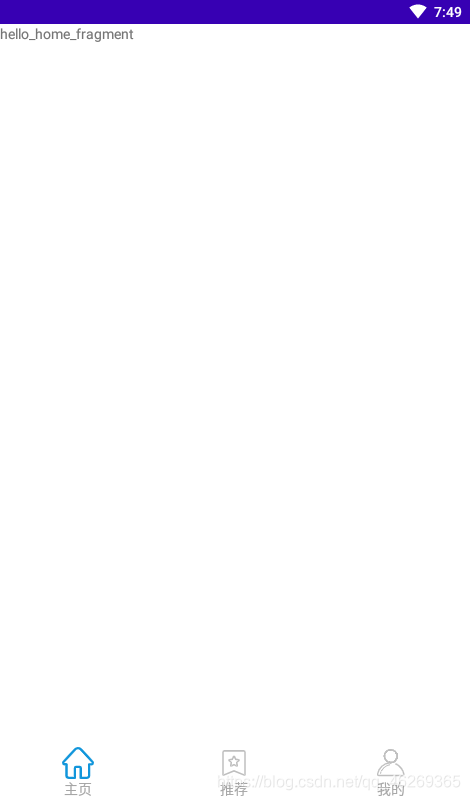
2、核心类和布局
(1)activity_main主页面布局
<?xml version="1.0" encoding="utf-8"?>
<LinearLayout xmlns:android="http://schemas.android.com/apk/res/android"
    xmlns:app="http://schemas.android.com/apk/res-auto"
    xmlns:tools="http://schemas.android.com/tools"
    android:layout_width="match_parent"
    android:layout_height="match_parent"
    android:orientation="vertical"
    tools:context=".MainActivity">

    <!--中间内容部分-->
    <androidx.viewpager.widget.ViewPager
        android:id="@+id/id_viewpager"
        android:layout_width="match_parent"
        android:layout_height="0dp"
        android:layout_weight="1"
        >
    </androidx.viewpager.widget.ViewPager>

    <!--底部导航栏部分布局文件-->
    <include layout="@layout/bottom"/>

</LinearLayout>
(2)底部导航栏部分bottom布局
<?xml version="1.0" encoding="utf-8"?>
<LinearLayout xmlns:android="http://schemas.android.com/apk/res/android"
    android:orientation="horizontal"
    android:layout_width="match_parent"
    android:layout_height="55dp"
    android:gravity="center">

    <LinearLayout
        android:id="@+id/id_tab1"
        android:layout_width="0dp"
        android:layout_height="wrap_content"
        android:layout_weight="1"
        android:gravity="center"
        android:orientation="vertical"
        >
        <ImageButton
            android:id="@+id/id_tab_img1"
            android:clickable="false"
            android:layout_width="wrap_content"
            android:layout_height="wrap_content"
            android:src="@drawable/icon1"
            android:background="#00000000"/>
        <TextView
            android:layout_width="wrap_content"
            android:layout_height="wrap_content"
            android:textColor="#A6A6A6"
            android:text="@string/hometab"/>
    </LinearLayout>
    <LinearLayout
        android:id="@+id/id_tab2"
        android:layout_width="0dp"
        android:layout_height="wrap_content"
        android:layout_weight="1"
        android:gravity="center"
        android:orientation="vertical">
        <ImageButton
            android:id="@+id/id_tab_img2"
            android:clickable="false"
            android:layout_width="wrap_content"
            android:layout_height="wrap_content"
            android:src="@drawable/icon2"
            android:background="#00000000"/>
        <TextView
            android:layout_width="wrap_content"
            android:layout_height="wrap_content"
            android:textColor="#A6A6A6"
            android:text="@string/recommendtab"/>
    </LinearLayout>
    <LinearLayout
        android:id="@+id/id_tab3"
        android:layout_width="0dp"
        android:layout_height="wrap_content"
        android:layout_weight="1"
        android:gravity="center"
        android:orientation="vertical">

        <ImageButton
            android:id="@+id/id_tab_img3"
            android:clickable="false"
            android:layout_width="wrap_content"
            android:layout_height="wrap_content"
            android:src="@drawable/icon3"
            android:background="#00000000"/>
        <TextView
            android:layout_width="wrap_content"
            android:layout_height="wrap_content"
            android:textColor="#A6A6A6"
            android:text="@string/minetab"/>
    </LinearLayout>

</LinearLayout>
(3)MainActivity.java
/**
 * 使用FragmentActivity,它是基于Fragment实现的活动类
 */
public class MainActivity extends FragmentActivity implements View.OnClickListener {

    //声明ViewPager
    private ViewPager mViewPager;
    //适配器
    private FragmentPagerAdapter mAdapter;
    //装载Fragment的集合
    private List<Fragment> mFragments;
    //三个Tab对应的布局
    private LinearLayout mTab1,mTab2,mTab3;
    //三个Tab对应的ImageButton
    private ImageButton mImg1,mImg2,mImg3;

    @Override
    protected void onCreate(Bundle savedInstanceState) {
        super.onCreate(savedInstanceState);
        requestWindowFeature(Window.FEATURE_NO_TITLE);
        setContentView(R.layout.activity_main);

        initViews();//初始化控件
        selectTab(0);//初始页面为主页面
        initEvents();//初始化事件
        initDatas();//初始化数据
    }
    //初始化控件
    private void initViews(){
        mViewPager = (ViewPager) findViewById(R.id.id_viewpager);

        mTab1 = (LinearLayout) findViewById(R.id.id_tab1);
        mTab2 = (LinearLayout) findViewById(R.id.id_tab2);
        mTab3 = (LinearLayout) findViewById(R.id.id_tab3);

        mImg1 = (ImageButton) findViewById(R.id.id_tab_img1);
        mImg2 = (ImageButton) findViewById(R.id.id_tab_img2);
        mImg3 = (ImageButton) findViewById(R.id.id_tab_img3);
    }

    private void initEvents(){
        //设置三个Tab的点击事件
        mTab1.setOnClickListener(this);
        mTab2.setOnClickListener(this);
        mTab3.setOnClickListener(this);
    }

    private void initDatas(){
        mFragments=new ArrayList<>();
        //将三个Fragment加入集合中
        mFragments.add(new HomeFragment());
        mFragments.add(new RecommendFragment());
        mFragments.add(new MineFragment());

        //初始化适配器
        mAdapter=new FragmentPagerAdapter(getSupportFragmentManager()) {
            @Override
            public Fragment getItem(int position) {
                return mFragments.get(position);
            }

            @Override
            public int getCount() {
                return mFragments.size();
            }
        };

        //设置ViewPager的适配器
        mViewPager.setAdapter(mAdapter);
        //将ViewPager的预加载个数设置为你的所有Fragment的数量,解决滑动时候轮播图出现空白的问题
        mViewPager.setOffscreenPageLimit(mFragments.size());
        //设置ViewPager的切换监听
        mViewPager.addOnPageChangeListener(new ViewPager.OnPageChangeListener() {
            //页面滚动事件
            @Override
            public void onPageScrolled(int position, float positionOffset, int positionOffsetPixels) {

            }
            //页面选中事件
            @Override
            public void onPageSelected(int position) {
                //设置position对应的集合中的fragment
                mViewPager.setCurrentItem(position);
                resetImgs();
                selectTab(position);
            }
            //页面滚动状态改变事件
            @Override
            public void onPageScrollStateChanged(int state) {

            }
        });
    }

    @Override
    public void onClick(View view) {
        //先将三个ImageButton置为灰色
        resetImgs();
        switch (view.getId()){
            case R.id.id_tab1:
                selectTab(0);
                break;
            case R.id.id_tab2:
                selectTab(1);
                break;
            case R.id.id_tab3:
                selectTab(2);
                break;
        }
    }
    //将三个ImageButton设置为灰色
    private void resetImgs() {
        mImg1.setImageResource(R.drawable.icon1);
        mImg2.setImageResource(R.drawable.icon2);
        mImg3.setImageResource(R.drawable.icon3);
    }

    private void selectTab(int i) {
        //根据点击的Tab设置对应的ImageButton为选中的颜色
        switch (i) {
            case 0:
                mImg1.setImageResource(R.drawable.icon1_selected);
                break;
            case 1:
                mImg2.setImageResource(R.drawable.icon2_selected);
                break;
            case 2:
                mImg3.setImageResource(R.drawable.icon3_selected);
                break;
        }
        //设置当前点击的Tab所对应的页面
        mViewPager.setCurrentItem(i);
    }
}
3、三个fragment,都一样
(1)新建三个blank fragment,我自己的是HomeFragment,RecommendFragment,MineFragment
/**
 * 首页HomeFragment
 */
public class HomeFragment extends Fragment {

    @Override
    public View onCreateView(LayoutInflater inflater, ViewGroup container,
                             Bundle savedInstanceState) {

        return inflater.inflate(R.layout.fragment_home, container, false);
    }
}
(2)三个fragment的布局文件也都一样
<?xml version="1.0" encoding="utf-8"?>
<FrameLayout xmlns:android="http://schemas.android.com/apk/res/android"
    xmlns:tools="http://schemas.android.com/tools"
    android:layout_width="match_parent"
    android:layout_height="match_parent"
    tools:context=".first_home.HomeFragment">

    <!-- TODO: Update blank fragment layout -->
    <TextView
        android:layout_width="match_parent"
        android:layout_height="match_parent"
        android:text="@string/hello_home_fragment" />

</FrameLayout>
附:在此之前也试过另一种办法,可参考:
https://blog.csdn.net/guolin_blog/article/details/13171191

Agent 垂直技术社区,欢迎活跃、内容共建。
更多推荐

 1
1 0
0- 0


 已为社区贡献3条内容

所有评论(0)