ffmpeg系列:使用C++类封装ffmpeg,实现打开视频文件功能
在visual studio 2013中新建c++类MyFFmpeg;在菜单栏点“项目----添加类”在弹出的选择窗体中依次点击选择“Visual C++ ----> C++类 ---->添加””在接下来的c++类添加向导窗体中填写相关类名,然后勾选“虚析构函数”选项点完成按钮MyFFmpeg.h头文件如下 :#pragma
·
在visual studio 2013中新建c++类MyFFmpeg;
在菜单栏点“项目----添加类”

在弹出的选择窗体中依次点击选择“Visual C++ ----> C++类 ---->添加”

在接下来的c++类添加向导窗体中填写相关类名,然后勾选“虚析构函数”选项点完成按钮
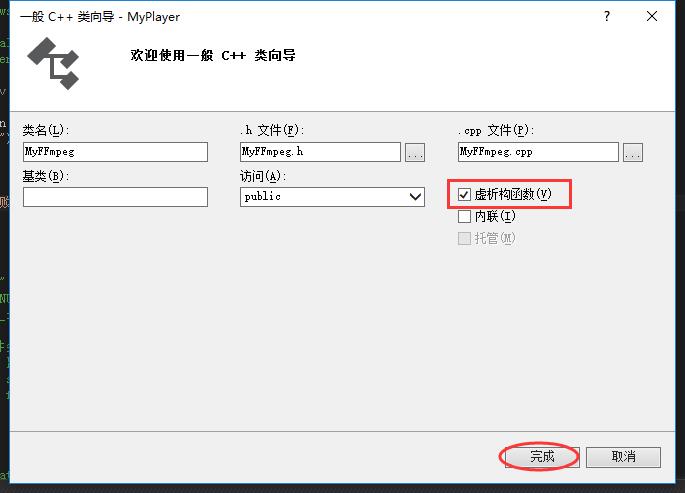
MyFFmpeg.h头文件如下 :
#pragma once
extern "C"{
#include <libavformat/avformat.h>
#include <libswscale/swscale.h>
}
#include <string>
#include <QMutex>
class MyFFmpeg
{
public:
	/*设置成为单件模式*/
	static MyFFmpeg *Get()
	{
		static MyFFmpeg ff;
		return &ff;
	}

	/*打开指定路径的视频文件*/
	bool Open(const char *path);

	/*关闭之前打开的视频文件*/
	void Close();

	/*获取相关错误信息*/
	std::string GetError();

	/*类析构函数*/
	virtual ~MyFFmpeg();

	/*视频文件总的毫秒数*/
	int totalMs = 0;
protected:
	/*相关错误信息*/
	char errorbuf[1024];

	//应对多线程访问时的同步锁
	QMutex mutex;

	AVFormatContext *ac = NULL;

	/*设置成为单件模式,所以要把构造函数设置为私有*/
	MyFFmpeg();
};
MyFFmpeg.cpp实现文件如下 :
#include "MyFFmpeg.h"
#pragma comment(lib,"avformat.lib")
#pragma comment(lib,"avutil.lib")
#pragma comment(lib,"avcodec.lib")
#pragma comment(lib,"swscale.lib")
bool MyFFmpeg::Open(const char *path){
	Close();
	mutex.lock();
	int re = avformat_open_input(&ac, path, 0, 0);
	if (re != 0){//打开文件失败
		mutex.unlock();
		av_strerror(re, errorbuf, sizeof(errorbuf));
		return false;
	}
	//得到视频总时长的毫秒数
	totalMs = ((ac->duration / AV_TIME_BASE)*1000);
	mutex.unlock();
	return true;
}
void MyFFmpeg::Close(){
	mutex.lock();
	if (ac) avformat_close_input(&ac);
	mutex.unlock();
}
std::string MyFFmpeg::GetError(){
	mutex.lock();
	std::string re = this->errorbuf;
	mutex.unlock();
	return re;
}

MyFFmpeg::MyFFmpeg()
{
	errorbuf[0] = '\0';
	av_register_all();
}
main.pp调用代码:
#include "myplayer.h"
#include <QtWidgets/QApplication>
#include "MyFFmpeg.h"

int main(int argc, char *argv[])
{
	char path[1024] = "test1.mp4";
	if (MyFFmpeg::Get()->Open(path)){
		printf("文件[%s]打开成功",path);
	}
	else
	{
		printf("\n文件[%s]打开失败;错误信息:%s", path,MyFFmpeg::Get()->GetError().c_str());
		getchar();
		return -1;
	}

	QApplication a(argc, argv);
	MyPlayer w;
	w.show();
	return a.exec();
}
运行结果如下:

如果把文件名写错,比如把test.mp4写成test1.mpr会是下面的结果;


Agent 垂直技术社区,欢迎活跃、内容共建。
更多推荐

 2
2 0
0- 0


 已为社区贡献28条内容

所有评论(0)