Activity管理Fragment之Fragment关闭当前回到之前Fragment
直接上代码说明:首先默认你已经写好了一个Activity并至少添加了一个Fragment,下面是我的Activity中Fragment的布局代码和java代码;Activity中Fragment的布局代码:xml version="1.0" encoding="utf-8"?>xmlns:android="http://schemas.android.com/apk/res/an
·
直接上代码说明:
首先默认你已经写好了一个Activity并至少添加了一个Fragment,下面是我的Activity中Fragment的布局代码和java代码;
Activity中Fragment的布局代码:
<?xml version="1.0" encoding="utf-8"?>
<LinearLayout xmlns:android="http://schemas.android.com/apk/res/android"
    android:layout_width="match_parent"
    android:layout_height="match_parent"
    android:orientation="vertical"
    android:background="@color/colorMainBackground">

    <LinearLayout
        android:layout_width="match_parent"
        android:layout_height="wrap_content"
        android:orientation="vertical">

        <TextView
            android:id="@+id/comment_fragment"
            android:layout_width="match_parent"
            android:layout_height="wrap_content"
            android:padding="20dp"
            android:layout_weight="1"
            android:text="@string/btn_comment"
            android:textColor="#000000"
            android:textSize="14sp"
            android:background="@color/colorWhite"/>


    </LinearLayout>

</LinearLayout>
Activity中Fragment的java代码:
package com.test.ezio.MainFragment;

import android.app.Fragment;
import android.app.FragmentManager;
import android.app.FragmentTransaction;
import android.os.Bundle;
import android.support.annotation.Nullable;
import android.view.LayoutInflater;
import android.view.View;
import android.view.ViewGroup;
import android.widget.TextView;

import com.test.ezio.doule.R;


/**
 * Created by zhaohaibin on 16/3/29.
 */
public class MineFragment extends Fragment {

    private TextView comment_fragment;


    @Nullable
    @Override
    public View onCreateView(LayoutInflater inflater, ViewGroup container, Bundle savedInstanceState) {

        View view = inflater.inflate(R.layout.fragment_mine, container, false);


        comment_fragment = (TextView) view.findViewById(R.id.comment_fragment);

        comment_fragment.setOnClickListener(new View.OnClickListener() {
            @Override
            public void onClick(View v) {

                FragmentManager fragmentManager = getFragmentManager();
                FragmentTransaction fragmentTransaction = fragmentManager.beginTransaction();
                fragmentTransaction.add(R.id.main_fl, new CommentInfoFragment(),"comment");
                fragmentTransaction.commit();

            }
        });


        return view;


    }
}
主要代码就是蓝色部分通过点击添加另一个Fragment,在添加的代码中多创建了一个tag即 "comment";
另一个Fragment的布局代码和java代码不再赘述,自己写的能通或者把我上面的再复制一遍都行,不管写了什么肯定有一个作为返回的组件,下面是我的返回方法中的代码:
fragment_btn_back= (Button) view.findViewById(R.id.fragment_btn_back);

fragment_btn_back.setOnClickListener(new View.OnClickListener() {
    @Override
    public void onClick(View v) {

        FragmentManager fragmentManager=getFragmentManager();
        Fragment fragment=fragmentManager.findFragmentByTag("comment");
        FragmentTransaction fragmentTransaction=fragmentManager.beginTransaction();
        fragmentTransaction.remove(fragment);
        fragmentTransaction.commit();
    }
});
主要代码仍然是蓝色部分通过点击移除这一个Fragment,在移除的代码前先进行了一个查找即"comment";
通过这两行关键的代码,完成了两个界面之间的“切换”,而这种“切换”原理如下图所示:
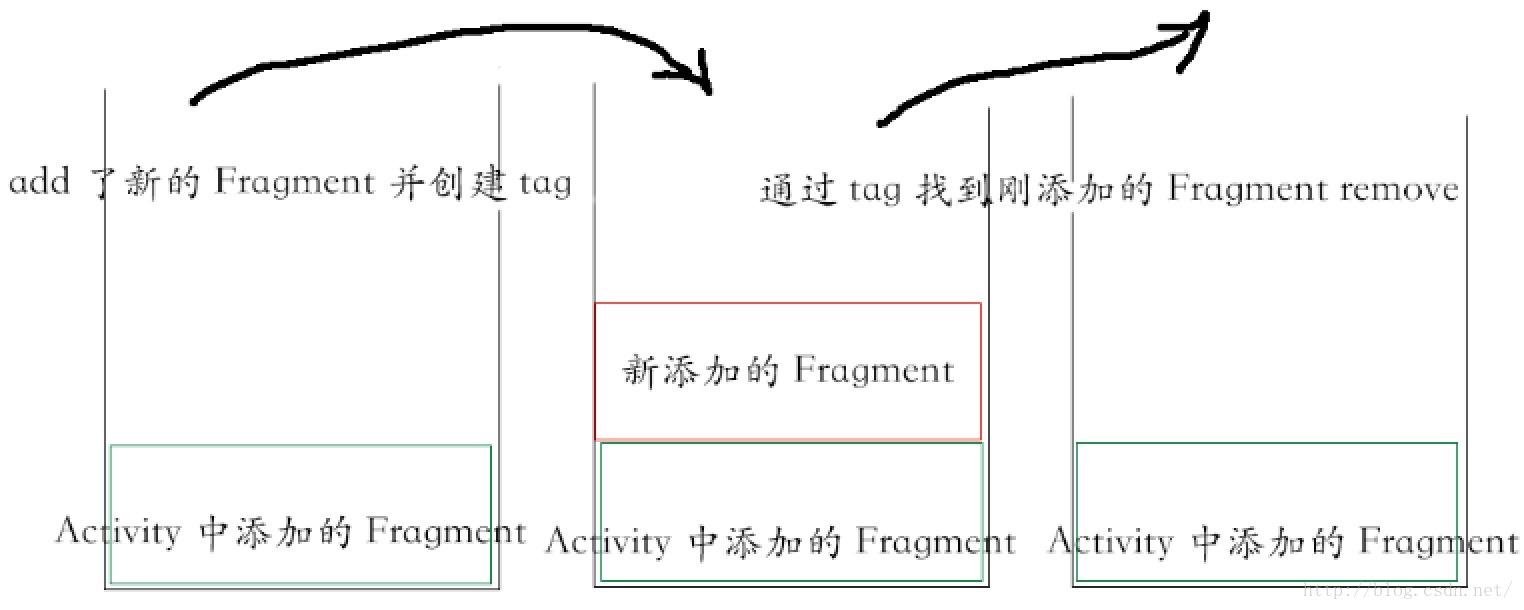
最先存在的在最下面,后面进来的在上面,想重新看到下面就要移掉上面,移掉上面哪个,那个贴着tag的;有人会想把之前的new一个继续添加,这个可以理解为瓶子装满水继续装一样。

Agent 垂直技术社区,欢迎活跃、内容共建。
更多推荐

 1
1 0
0- 0


 已为社区贡献1条内容

所有评论(0)